Website Development for Small Businesses: Complete Guide for 2026#
A website is no longer optional for most small businesses.
Whether you run a local service business, restaurant, consultancy, salon, clothing brand, real estate company, agency, clinic, manufacturing business, or professional service, customers increasingly expect to find your business online before they contact you.
But simply having a website is not enough.
A slow website, outdated design, poor mobile experience, confusing navigation, or weak call-to-action can actually hurt your business.
In 2026, a small-business website needs to do much more than display your company information. It should build trust, generate leads, support search visibility, communicate your value proposition, and make it easy for customers to take action.
This guide explains everything a small business needs to know about website development in 2026, including website types, costs, features, technology choices, SEO, design, security, maintenance, common mistakes, and how to choose the right development partner.
What Is Website Development?#
Website development is the process of planning, designing, building, testing, deploying, and maintaining a website.
It includes much more than coding.
A professional website project can involve:
- Business strategy
- Information architecture
- UI/UX design
- Content
- Frontend development
- Backend development
- Database development
- API integrations
- SEO
- Performance optimization
- Security
- Analytics
- Hosting
- Maintenance
For a small business, the goal should not be to build the most technically complicated website possible.
The goal should be to build a website that solves a specific business problem.
That could be:
- Generating leads
- Selling products
- Getting calls
- Receiving WhatsApp enquiries
- Booking appointments
- Building credibility
- Getting local customers
- Displaying a portfolio
- Providing customer information
- Automating business processes
Why Does a Small Business Need a Website in 2026?#
Social media is useful, but it should not be your entire digital presence.
Platforms such as Instagram, Facebook, LinkedIn, and YouTube are controlled by third-party companies.
Your website is different.
You control the domain, content, structure, customer journey, and data integrations.
A professional website can help a business:
Build Credibility#
Customers are more likely to trust a business that has a professional online presence.
Generate Leads#
Your website can collect enquiries through forms, WhatsApp, phone calls, booking systems, and other conversion mechanisms.
Get Found on Google#
With proper SEO, your website can appear when potential customers search for your products or services.
Showcase Your Products or Services#
You can provide detailed information that may be difficult to communicate through social media posts.
Sell Online#
E-commerce websites allow businesses to accept orders and payments directly.
Work 24/7#
Your website can provide information and generate enquiries even when your physical business is closed.
What Type of Website Does a Small Business Need?#
There is no single website structure that works for every business.
The right website depends on your business model.
1. Business Website#
Ideal for:
- Consultants
- Agencies
- Service providers
- Contractors
- Professionals
- Local businesses
- B2B companies
Typical pages include:
- Home
- About
- Services
- Portfolio
- Testimonials
- FAQ
- Contact
This is usually the most straightforward option.
2. Local Business Website#
Local businesses need a website designed around local search and customer actions.
Examples include:
- Restaurants
- Salons
- Gyms
- Clinics
- Hotels
- Repair services
- Real estate agencies
- Coaching centers
- Lawyers
- Accountants
Important features can include:
- Google Maps
- Click-to-call
- Business hours
- Location information
- Reviews
- Service areas
- Booking forms
The goal is simple:
Make it easy for a nearby customer to choose and contact your business.
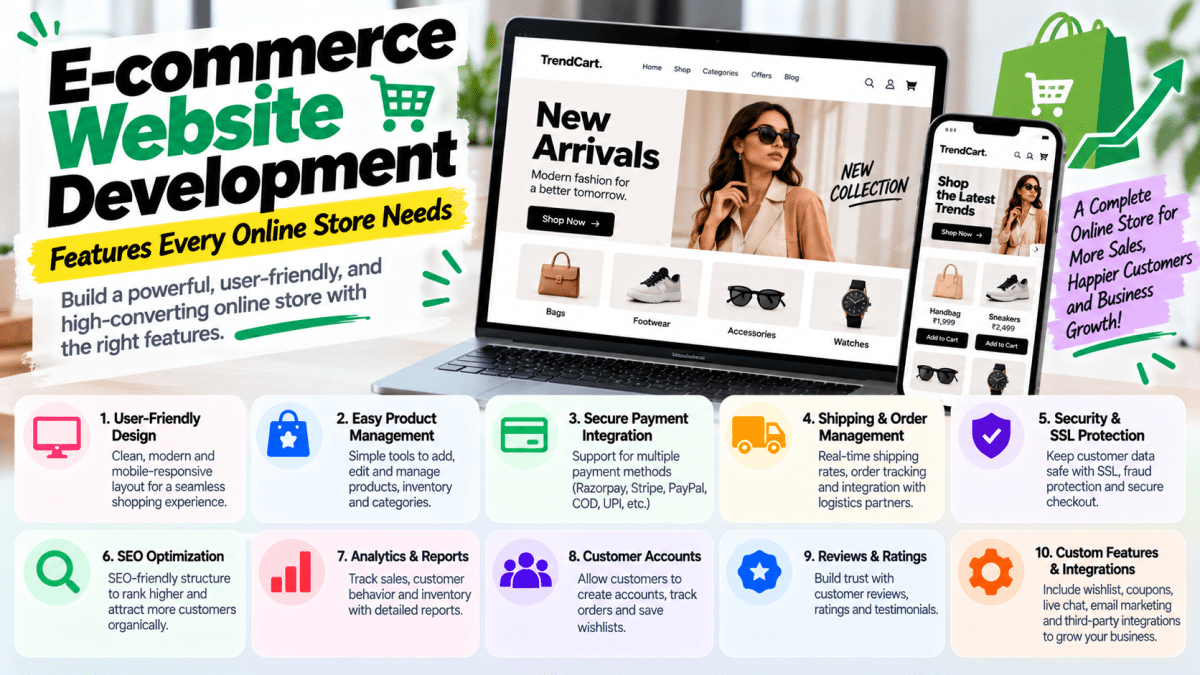
3. E-commerce Website#
If you sell physical or digital products, you may need an e-commerce website.
Important features include:
- Product catalog
- Categories
- Product search
- Filters
- Product variants
- Shopping cart
- Checkout
- Payment gateway
- Shipping
- Order management
- Inventory
- Customer accounts
- Coupons
- Reviews
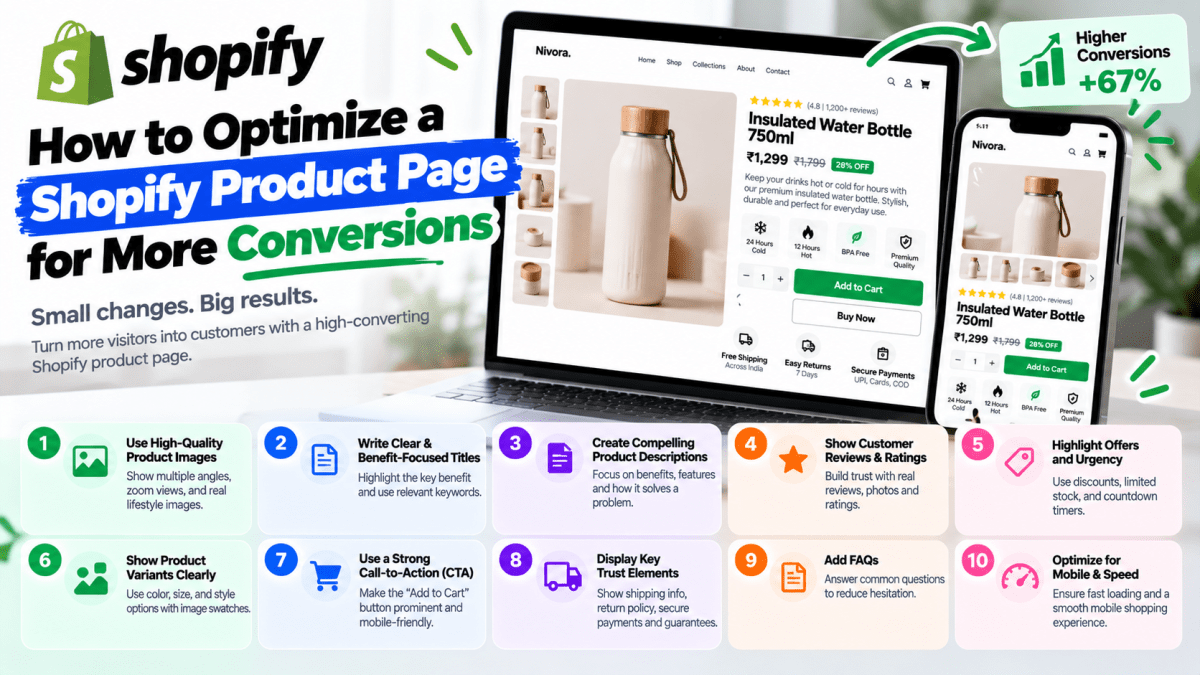
Platforms such as Shopify and WooCommerce can be suitable for many small businesses.
4. Portfolio Website#
Portfolio websites are useful for:
- Designers
- Developers
- Photographers
- Architects
- Agencies
- Freelancers
- Creators
The primary objective is to demonstrate previous work and establish credibility.
A strong portfolio should not simply display images.
It should explain:
- The client's problem
- Your solution
- Your process
- The outcome
- Relevant results
5. Booking Website#
Businesses that operate through appointments may benefit from booking functionality.
Examples include:
- Doctors
- Consultants
- Salons
- Trainers
- Coaches
- Hotels
- Service professionals
Customers should be able to see availability and schedule an appointment without unnecessary communication.
6. Custom Web Application#
Some businesses eventually outgrow a standard website.
They may need:
- Customer dashboards
- Employee portals
- CRM systems
- Inventory systems
- Booking systems
- Payment management
- Reports
- Automation
- API integrations
At that point, the project becomes a web application rather than a simple marketing website.
The development cost and complexity can increase substantially.
How Much Does a Small Business Website Cost in India in 2026?#
The cost depends on scope.
A rough range is:
| Website Type | Approximate Cost |
|---|---|
| Basic Website | ₹10,000 – ₹30,000 |
| Professional Business Website | ₹30,000 – ₹75,000 |
| Premium Business Website | ₹75,000 – ₹2,00,000+ |
| WordPress Website | ₹15,000 – ₹80,000+ |
| Shopify Store | ₹25,000 – ₹1,00,000+ |
| E-commerce Website | ₹30,000 – ₹3,00,000+ |
| Custom Web Application | ₹1,00,000+ |
These are indicative ranges.
The final price depends on:
- Number of pages
- Design complexity
- Technology
- Functionality
- Integrations
- Content
- SEO
- Hosting
- Maintenance
- Custom development requirements
A business should compare scope and expected business value, not just the final quote.
What Should a Small Business Website Include?#
A professional small-business website should generally include the following.
1. Strong Homepage#
Your homepage should immediately communicate:
What do you do?
Who do you serve?
Why should customers choose you?
What should they do next?
For example:
Professional Website Development for Growing Businesses
Then support the headline with:
- Clear value proposition
- Services
- Benefits
- Social proof
- Testimonials
- Portfolio
- CTA
2. About Us Page#
Your About page should explain:
- Who you are
- What your company does
- Your experience
- Your approach
- Your values
- Why customers should trust you
Avoid turning this page into a long corporate biography.
Customers care about how your business can help them.
3. Services or Products#
Every important service should have clear information.
Instead of simply writing:
Web Development
Explain:
- What you provide
- Who it is for
- What is included
- Benefits
- Process
- Pricing guidance if appropriate
- FAQs
- CTA
Detailed service pages are also useful for SEO.
4. Contact Page#
Your contact page should make communication effortless.
Include:
- Phone
- Address
- Google Maps
- Contact form
- Business hours
- Social profiles
Don't make customers hunt for your contact information.
5. Testimonials#
Social proof matters.
Include genuine:
- Customer reviews
- Testimonials
- Case studies
- Ratings
- Client logos
Avoid fake testimonials.
They can damage trust rather than improve it.
6. Clear Calls-to-Action#
Every important page should provide an obvious next step.
Examples:
- Get a Quote
- Contact Us
- Book a Consultation
- Request a Callback
- Start Your Project
- Shop Now
- WhatsApp Us
- Schedule a Demo
A website without a clear CTA is like a salesperson who explains the product and then walks away.
Mobile-First Website Development#
A huge percentage of users access websites from smartphones.
Therefore, mobile responsiveness is not an optional feature.
Your website should work properly across:
- Smartphones
- Tablets
- Laptops
- Desktop computers
Test:
- Navigation
- Buttons
- Forms
- Images
- Typography
- Checkout
- Page speed
A website that looks excellent on a desktop but is frustrating on a phone is not a professional website.
Website Speed Matters#
Users do not like slow websites.
A slow website can contribute to:
- Higher bounce rates
- Lower conversions
- Poor user experience
- Reduced engagement
Performance optimization can involve:
- Image compression
- Modern image formats
- Code optimization
- Caching
- CDN
- Lazy loading
- Reducing unnecessary scripts
- Efficient hosting
Don't add animations and third-party scripts simply because they look impressive.
If they make the website slower, they may be hurting the business.
SEO for Small Business Websites#
Search engine optimization helps your website become more discoverable through search engines.
A basic SEO strategy should include:
Keyword Research#
Identify what your customers are actually searching for.
Page Titles#
Create descriptive and relevant page titles.
Meta Descriptions#
Write useful descriptions that encourage searchers to click.
Headings#
Use logical H1, H2, and H3 structures.
Internal Linking#
Connect relevant pages together.
Image Optimization#
Use descriptive filenames and alt text.
Technical SEO#
Ensure search engines can crawl and understand your website.
Local SEO#
Optimize your website and Google Business Profile for local searches.
Local SEO Is Critical for Many Small Businesses#
If you operate in a specific city or service area, local SEO can be extremely valuable.
For example:
A Jaipur-based wedding photographer may want to rank for:
wedding photographer in Jaipur
A restaurant may target:
best restaurant in Jaipur
A web agency may target:
website development company in Jaipur
Your website should clearly communicate:
- Business location
- Service areas
- Services
- Contact details
- Local relevance
Consistency across your website and business listings is important.
WordPress vs Custom Development#
This is one of the most common decisions businesses face.
WordPress#
Advantages:
- Faster development
- Large ecosystem
- Easy content management
- Many plugins
- Cost-effective
- Suitable for many business websites
Disadvantages:
- Plugin conflicts
- Maintenance requirements
- Security risks from outdated components
- Can become bloated
Custom Development#
Advantages:
- Greater control
- Custom functionality
- Better suited to unique requirements
- Greater architectural flexibility
- Easier to build specialized workflows
Disadvantages:
- Higher initial cost
- Longer development time
- Requires technical maintenance
- More development expertise required
The right answer depends on your requirements.
If you need a simple business website, custom development may be unnecessary.
If you need a complex business application, WordPress may not be the right foundation.
Shopify vs WooCommerce#
For e-commerce businesses, Shopify and WooCommerce are two popular options.
Shopify#
Good for businesses that want:
- Faster setup
- Managed infrastructure
- Easy store management
- E-commerce-focused features
WooCommerce#
Good for businesses that want:
- WordPress integration
- Greater customization
- More control over hosting
- Flexible content management
Neither platform is automatically better.
Your choice should depend on:
- Product catalog
- Budget
- Technical expertise
- Customization requirements
- Integrations
- Long-term plans
Website Security for Small Businesses#
Small businesses often assume hackers only target large companies.
That assumption is wrong.
Automated attacks can target websites regardless of business size.
Basic security practices include:
- HTTPS
- Strong passwords
- Secure hosting
- Regular backups
- Software updates
- Secure authentication
- Firewall protection
- Limited admin access
- Monitoring
- Reliable plugins and dependencies
If your website handles payments or customer information, security becomes even more important.
Website Analytics#
You cannot improve what you do not measure.
Analytics can help you understand:
- How many people visit
- Where visitors come from
- Which pages they view
- How long they stay
- What devices they use
- Which pages generate conversions
- Where users leave
For a small business, useful tracking may include:
- Website traffic
- Phone clicks
- WhatsApp clicks
- Form submissions
- Purchases
- Booking requests
- CTA clicks
The objective is not to collect hundreds of metrics.
Track the numbers that actually influence business decisions.
Integrating WhatsApp With Your Website#
For many Indian businesses, WhatsApp is one of the most effective conversion channels.
A website can include:
- WhatsApp CTA
- Floating WhatsApp button
- Pre-filled messages
- Product enquiries
- Appointment enquiries
- Lead routing
For example:
Hi, I found your website and would like to know more about your website development services.
This reduces friction between discovering the business and starting a conversation.
Payment Gateway Integration#
If your website sells products or services online, you may need payment integration.
Popular options in India include:
- Razorpay
- Cashfree
- PayU
- Stripe
- PayPal
The right payment provider depends on your business model and payment requirements.
Your website may also need:
- Payment confirmation
- Failed payment handling
- Refund workflows
- Order creation
- Email notifications
- Invoice generation
How Long Does It Take to Build a Small Business Website?#
A basic website may take anywhere from a few days to several weeks.
A typical timeline might look like:
Week 1#
- Requirements
- Sitemap
- Content collection
- Design direction
Week 2#
- UI design
- Homepage
- Internal pages
- Mobile design
Week 3#
- Development
- Forms
- Integrations
- SEO setup
Week 4#
- Testing
- Performance optimization
- Client review
- Deployment
More complex projects can take significantly longer.
The biggest delays are often not caused by coding.
They are caused by:
- Missing content
- Delayed approvals
- Changing requirements
- Poor communication
- Scope changes
Common Website Mistakes Small Businesses Make#
Mistake 1: Choosing the Cheapest Developer#
Cheap development can become expensive if the website needs to be rebuilt later.
Mistake 2: Using a Website Only as a Digital Brochure#
Your website should have a business objective.
Mistake 3: Ignoring Mobile Users#
Mobile responsiveness is mandatory.
Mistake 4: No Clear CTA#
Visitors should know what to do next.
Mistake 5: Poor Website Copy#
A beautiful design cannot compensate for unclear messaging.
Mistake 6: Ignoring SEO#
If search traffic matters to your business, SEO needs to be considered from the beginning.
Mistake 7: No Analytics#
Without tracking, you don't know what is working.
Mistake 8: No Maintenance Plan#
Websites require updates and monitoring.
Mistake 9: Overloading the Website#
Too many animations, popups, scripts, and plugins can hurt performance.
Mistake 10: Not Owning Your Digital Assets#
Your business should maintain control of important credentials and assets such as:
- Domain
- Hosting
- Website
- Google Business Profile
- Analytics
- Search Console
- Social accounts
Never build your entire digital infrastructure around an account controlled exclusively by an outside freelancer.
How to Choose a Website Development Company#
Before selecting an agency, evaluate:
Portfolio#
Look at real websites they have built.
Experience#
Do they understand your industry and business model?
Process#
Do they have a structured development process?
Communication#
Can you communicate with the actual team?
Pricing#
Is the scope clearly defined?
Support#
What happens after launch?
Technology#
Are they choosing technology based on your requirements?
Ownership#
Will you receive the necessary credentials and assets?
Do not select an agency purely because its website looks impressive.
Evaluate whether the agency can understand and solve your business problem.
What Should You Give Your Web Development Agency?#
To keep the project moving efficiently, prepare:
- Logo
- Brand colors
- Business information
- Service details
- Product information
- Images
- Videos
- Testimonials
- Contact details
- Social media links
- Domain information
- Hosting details
- Competitor websites
- Target audience
- Business goals
The clearer the requirements, the fewer unnecessary revisions you are likely to need.
How to Make Your Website Generate More Leads#
A website should not merely attract visitors.
It should convert relevant visitors into prospects.
Some important conversion strategies include:
Strong Headline#
Explain your value proposition immediately.
Clear CTA#
Tell users what action to take.
Social Proof#
Show evidence that customers trust you.
Case Studies#
Demonstrate actual results.
Simple Forms#
Don't ask for 15 fields when 4 will work.
WhatsApp#
Give users a fast communication channel.
Fast Loading#
Don't make users wait.
Mobile Optimization#
Make conversion easy on smartphones.
Relevant Landing Pages#
Create dedicated pages for specific services and campaigns.
Website Development and Digital Marketing Should Work Together#
One common mistake is treating the website as a completely separate project from marketing.
They should work together.
For example:
Google Ads → Landing Page → Lead Form → CRM → Sales Team
Or:
Instagram → Website → WhatsApp → Sales Conversation
Or:
Google Search → SEO Landing Page → Enquiry → Sales
Your website is often the central conversion point connecting multiple marketing channels.
That means the website should be designed with the entire customer journey in mind.
Should Small Businesses Invest in a Custom Website?#
In many cases, yes.
But not necessarily an expensive custom application.
There is an important distinction between:
Custom-designed website
and
Custom-built software application
A small business may benefit from a professionally designed website without requiring a completely custom software architecture.
The right level of customization depends on the business problem.
Don't pay for complexity you don't need.
What Is the Ideal Website Budget for a Small Business?#
For many small businesses in India, a practical initial website budget can be around:
₹20,000–₹50,000
This can provide enough room for:
- Professional design
- Responsive development
- Core pages
- Lead generation
- Basic SEO
- WhatsApp integration
- Analytics
- Deployment
Businesses with more complex requirements should budget accordingly.
The important thing is to define the expected business outcome before deciding the budget.
Why a Website Should Be Treated as a Business Asset#
A website is not simply another expense.
A well-built website can become an asset that continuously supports:
- Marketing
- Sales
- Branding
- Customer support
- Lead generation
- E-commerce
- Recruitment
- Business automation
Imagine spending ₹40,000 on a website that generates ₹4 lakh in additional business.
The website wasn't really a ₹40,000 expense.
It became a revenue-generating asset.
That is the mindset businesses should adopt.
How Stitchbyte Helps Small Businesses Build Their Online Presence#
At Stitchbyte, we work with businesses that need more than a basic online brochure.
Our website development services can include:
- Business website development
- Custom website development
- WordPress development
- Shopify development
- E-commerce development
- Landing page development
- UI/UX design
- SEO-ready websites
- Website performance optimization
- Payment gateway integration
- WhatsApp integration
- Analytics setup
- AI integrations
- Business automation
- Custom software development
Our approach is to understand the business first and then recommend the appropriate technology and scope.
For a small business, that might mean a focused five-to-ten-page website.
For an e-commerce company, it might mean a complete Shopify or WooCommerce store.
For a growing technology company, it could mean a custom web application.
The technology should serve the business—not the other way around.
Small Business Website Launch Checklist#
Before launching your website, make sure you have checked:
Design#
- [ ] Desktop responsive
- [ ] Mobile responsive
- [ ] Tablet responsive
- [ ] Consistent branding
- [ ] Clear navigation
- [ ] Clear CTAs
Content#
- [ ] Homepage
- [ ] About page
- [ ] Service/product pages
- [ ] Contact page
- [ ] FAQs
- [ ] Testimonials
- [ ] Privacy Policy
- [ ] Terms and conditions
SEO#
- [ ] Page titles
- [ ] Meta descriptions
- [ ] H1 headings
- [ ] Image alt text
- [ ] Internal links
- [ ] Sitemap
- [ ] Robots.txt
- [ ] Search Console
- [ ] Analytics
Performance#
- [ ] Images optimized
- [ ] Page speed tested
- [ ] Unnecessary scripts removed
- [ ] Mobile performance checked
Security#
- [ ] HTTPS enabled
- [ ] Strong passwords
- [ ] Backups configured
- [ ] Admin access secured
- [ ] Software updated
Conversion#
- [ ] Contact form working
- [ ] WhatsApp button working
- [ ] Phone links working
- [ ] Email links working
- [ ] CTA buttons working
- [ ] Analytics tracking conversions
Frequently Asked Questions#
How much does website development cost for a small business in India?#
A small-business website can cost approximately ₹10,000–₹75,000+, depending on the design, functionality, number of pages, technology, SEO, integrations, and development provider.
Is a website necessary for a small business?#
For most businesses, having a professional website is highly beneficial. It provides a controlled digital presence and can support credibility, SEO, lead generation, sales, and customer communication.
Should I choose WordPress or custom development?#
For many small businesses, WordPress is cost-effective and practical. Custom development becomes more appropriate when the business needs unique functionality or complex workflows.
How much does a WordPress website cost?#
A WordPress website can range from approximately ₹15,000 to ₹80,000+, depending on customization and functionality.
How much does a Shopify website cost?#
A Shopify development project can start around ₹25,000 and exceed ₹1,00,000 for advanced customization.
How long does it take to build a small business website?#
A basic website can take several days to a few weeks. More complex projects may take several months.
Does a website automatically rank on Google?#
No.
Launching a website does not guarantee search rankings. SEO requires technical optimization, relevant content, authority, and ongoing work.
Can a website generate leads?#
Yes. A website can generate leads through forms, calls, WhatsApp, bookings, downloads, chatbots, and other conversion mechanisms.
Do I need SEO when building my website?#
If organic search traffic is important to your business, SEO should be considered during development rather than added as an afterthought.
How often should a business website be updated?#
There is no universal schedule. Security updates should be performed regularly, while content, design, services, products, and functionality should be updated whenever business requirements change.
Final Thoughts#
A small-business website does not need to be unnecessarily complicated.
It needs to be useful.
It should communicate your value clearly, build trust, work perfectly on mobile devices, load quickly, be discoverable through search engines, and make it easy for customers to contact or buy from you.
The best website is not necessarily the website with the most features.
It is the website that helps the business achieve its objectives.
If your goal is to generate leads, build around lead generation.
If your goal is e-commerce, optimize around product discovery and checkout.
If your goal is local customers, prioritize local SEO and easy contact.
If your goal is automation, integrate the systems that eliminate manual work.
Build the website around the business—not the other way around.
And if you are evaluating website development companies, don't just compare quotations.
Compare:
Strategy + Design + Technology + SEO + Performance + Support + Business Value.
That is what determines whether your website becomes a genuine business asset or simply another URL on the internet.
Planning a Custom Website or Web App in 2026?
Avoid agency markups and hidden renewal fees. Speak with our lead architects for a transparent, itemized scope and architectural proposal tailored to your business goals.
Related Topics & Tags
Enjoyed this article?
Share it with your teammates or network.
StitchByte Team
AuthorPublished by the StitchByte engineering & design team. We build high-performance web applications, AI automation agents, and modern digital platforms for scaling businesses across India and globally.