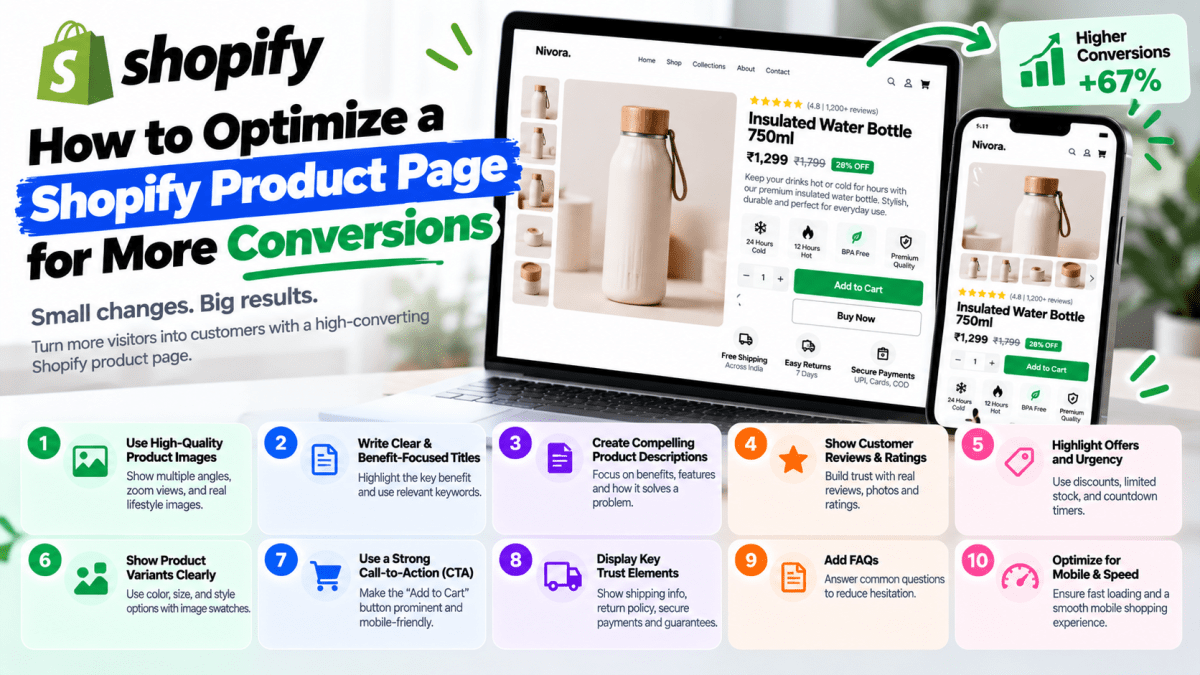
How to Optimize a Shopify Product Page for More Conversions#
Your Shopify product page is where browsing turns into buying.
A customer can discover your brand through Google, Instagram, Meta Ads, influencers, email, or a direct search. But eventually, if they want to purchase, they usually arrive at one critical page:
The product page.
And that page has one major job:
Give the customer enough information, confidence, and motivation to make a purchase.
Many Shopify stores spend thousands of rupees on advertising but treat their product pages as an afterthought. They upload a product image, add a short description, display the price, and place an "Add to Cart" button.
That isn't enough in a competitive e-commerce market.
Customers cannot physically touch your product. They cannot ask a salesperson questions. They cannot inspect the material themselves. Your product page has to replace much of that experience.
A well-optimized Shopify product page should answer:
- What is this product?
- Why should I buy it?
- Is it right for me?
- How much does it cost?
- Can I trust this brand?
- When will I receive it?
- Can I return it?
- What do other customers say?
- What happens after I click Buy?
In this guide, we'll explain how to optimize a Shopify product page for more conversions, including product photography, copywriting, CTAs, reviews, trust signals, mobile UX, SEO, performance, shipping information, and conversion optimization.
What Is a Shopify Product Page?#
A Shopify product page is the page where customers can view information about an individual product and typically take actions such as:
- Selecting variants
- Adding the product to cart
- Buying immediately
- Viewing product images
- Reading descriptions
- Checking reviews
- Understanding shipping and returns
A basic product page might contain:
Product title → Images → Price → Description → Add to Cart
A conversion-focused product page goes much further.
It creates a structured argument for why the customer should buy.
Think of it as your 24/7 digital salesperson.
Why Product Page Optimization Matters#
Getting visitors to your website costs money and effort.
You may invest in:
- Meta Ads
- Google Ads
- SEO
- Instagram content
- Influencers
- Email marketing
- Affiliate marketing
- Content marketing
But traffic alone doesn't generate revenue.
Your product page needs to convert that traffic.
Consider a simplified example.
Suppose your Shopify store receives:
10,000 visitors
At a 0.5% conversion rate:
50 orders
If your average order value is ₹2,000:
₹100,000 revenue
Now imagine the store improves its conversion rate to 1%.
The same traffic could produce:
100 orders
At the same ₹2,000 average order value:
₹200,000 revenue
The actual result will depend on your business, traffic quality, pricing, product, and market.
But the principle is important:
Improving the percentage of visitors who purchase can increase revenue without requiring proportional increases in traffic.
1. Use High-Quality Product Photography#
Product photography is one of the first things customers notice.
Before reading your description, many shoppers will look at the images.
Poor photography can create doubt.
Professional photography can communicate:
- Quality
- Size
- Texture
- Design
- Color
- Use case
- Brand positioning
Don't use only one product image#
Give customers multiple perspectives.
Depending on the product, include:
- Front view
- Back view
- Side view
- Close-up
- Detail shot
- Product in use
- Lifestyle image
- Packaging
- Different colors or variants
For fashion products, for example, consider showing:
- Front
- Back
- Side
- Model wearing the product
- Fabric close-up
- Size reference
- Different styling options
The customer should not have to guess what the product looks like.
2. Make the Product Title Clear#
Your product title should tell customers exactly what they're looking at.
Avoid overly creative names that provide no information.
Weak#
The Midnight
Better#
Premium Black Leather Wallet
The second title immediately communicates:
- Product type
- Material
- Color
You can still have creative branding while making the product itself understandable.
Keep titles readable#
Don't stuff titles with unnecessary keywords.
Your product title should primarily serve the customer.
SEO matters, but readability and clarity come first.
3. Write Product Descriptions That Sell Benefits#
One of the biggest mistakes Shopify stores make is writing descriptions that only list features.
For example:
"Made with 100% cotton. 240 GSM. Regular fit."
That's useful information—but it doesn't tell the customer why those features matter.
A better description connects features with benefits.
Feature#
240 GSM cotton fabric
Benefit#
A heavier, premium-feeling fabric designed to provide better structure and durability.
The customer isn't buying "240 GSM."
They're buying the experience and outcome associated with it.
Features vs Benefits#
A strong product page can use both.
| Feature | Customer Benefit |
|---|---|
| Waterproof material | Helps protect your belongings from rain |
| Lightweight construction | Easier to carry throughout the day |
| 100% cotton | Soft and breathable feel |
| Fast charging | Spend less time waiting for your device |
| Adjustable strap | Allows a more personalized fit |
The formula is simple:
Feature → Why it matters → Customer benefit
4. Put the Most Important Information Above the Fold#
The area customers see before scrolling is extremely valuable.
Your first screen should quickly communicate:
- Product image
- Product name
- Price
- Key benefit
- Rating/reviews
- Variants
- Primary CTA
- Important offer or shipping information
The customer shouldn't need to scroll halfway down the page just to understand what you're selling.
Example structure#
Premium Cotton Oversized T-Shirt
★★★★★ 4.8/5 — 327 reviews
₹1,499
Available in Black, White & Navy
Soft heavyweight cotton designed for everyday comfort.
[Select Size]
[Add to Cart]
Free shipping above ₹999
This immediately provides the information needed to continue evaluating the purchase.
5. Make the Add to Cart Button Impossible to Miss#
Your primary CTA should be visually obvious.
Common CTA labels include:
- Add to Cart
- Buy Now
- Shop Now
- Order Now
For most product pages, Add to Cart and Buy Now are straightforward choices.
Avoid hiding your CTA inside the design.
Your CTA should have:#
- Strong visual contrast
- Clear wording
- Adequate size
- Enough spacing
- Easy tap target on mobile
The customer should never wonder:
"Where do I buy this?"
6. Optimize the Mobile Product Page#
This deserves special attention.
A customer might discover your product through an Instagram advertisement while using their phone.
They click.
Your product page loads.
Now they need to:
- View the product
- Select a variant
- Read information
- Add to cart
- Checkout
Everything needs to work comfortably on a small screen.
Test these elements#
Images#
Can customers swipe through them easily?
Product title#
Is it readable without awkward wrapping?
Price#
Can customers immediately see it?
Variants#
Can sizes/colors be selected easily?
CTA#
Can the Add to Cart button be tapped comfortably?
Description#
Is the most important information easy to find?
Reviews#
Can customers access them without excessive scrolling?
Sticky CTA#
For some stores, a sticky Add to Cart bar on mobile can make purchasing easier.
But it should be tested rather than added automatically.
7. Show Reviews and Ratings#
Reviews reduce uncertainty.
When customers see that other people purchased and liked a product, the perceived risk can decrease.
Display reviews prominently.
Useful review information can include:
- Star rating
- Review count
- Written reviews
- Customer photos
- Verified purchase indicators where appropriate
- Review filtering
Don't hide your reviews#
A common mistake is putting reviews at the very bottom of a huge page.
Depending on the product, consider showing the overall rating near the product title.
For example:
★★★★★ 4.7/5 — 1,248 reviews
This immediately provides social proof.
8. Use Customer Photos and Videos#
Text reviews are useful.
Visual customer content can be even more persuasive for many products.
For example:
"Looks amazing!"
is helpful.
But:
A real customer wearing the product
provides additional context.
User-generated content can help customers understand:
- How the product looks in real life
- Actual product size
- How it fits
- How it is used
- What the packaging looks like
This is particularly useful for:
- Fashion
- Beauty
- Home products
- Accessories
- Lifestyle products
Always use customer content appropriately and with the necessary permissions.
9. Make Pricing Easy to Understand#
Don't make customers hunt for the price.
Display it clearly near the product title.
If you're offering a discount, show the value clearly.
For example:
~~₹2,499~~
₹1,999
20% OFF
If there's a limited-time promotion, communicate it honestly.
Avoid fake urgency such as permanently displaying:
"Only 2 left!"
when inventory isn't actually that low.
Short-term conversion gains aren't worth damaging customer trust.
10. Clearly Display Discounts and Offers#
Offers can increase purchase motivation, but only when communicated properly.
Examples include:
- 10% off first order
- Buy 2, Get 1
- Free shipping above ₹999
- Bundle discount
- Limited-time sale
- Buy more, save more
Instead of hiding an offer somewhere on the homepage, connect it directly to the product page.
For example:
Buy 2 and get 10% off
or:
Free shipping on orders above ₹999
The customer should understand the offer before checkout.
11. Show Shipping Information Near the Product#
One of the biggest sources of purchase hesitation is uncertainty around delivery.
Customers want to know:
"When will I receive this?"
Don't force them to search through your website.
Consider displaying:
🚚 Estimated delivery: 3–5 business days
or:
Free shipping on orders above ₹999
If you offer COD:
Cash on Delivery available
where applicable.
For Indian e-commerce businesses, delivery expectations can have a significant effect on purchase decisions.
12. Be Transparent About Returns and Exchanges#
Before purchasing, customers may worry:
"What if this doesn't fit?"
"What if I don't like it?"
"What if the product arrives damaged?"
A clear return/exchange policy can reduce uncertainty.
Communicate:
- Return window
- Exchange conditions
- Refund process
- Non-returnable products
- Damaged-product procedure
- Return shipping conditions
Don't bury this information inside a 2,000-word policy page.
Provide a concise summary on the product page and link to the full policy.
13. Add Product-Specific FAQs#
A product FAQ can eliminate objections before they become abandoned carts.
For example, a clothing product could answer:
Does this product run true to size?#
Yes. We recommend choosing your usual size. See the size guide for detailed measurements.
What material is it made from?#
100% cotton.
How long does delivery take?#
Orders are generally delivered within the displayed delivery window.
Can I exchange the size?#
Refer to the store's exchange policy for eligible products.
The questions should be based on actual customer concerns—not generic filler.
14. Add a Useful Size Guide#
For fashion and apparel stores, this is critical.
Customers often hesitate because they're unsure about fit.
A useful size guide can include:
| Size | Chest | Waist | Length |
|---|---|---|---|
| S | 38" | 30" | 27" |
| M | 40" | 32" | 28" |
| L | 42" | 34" | 29" |
| XL | 44" | 36" | 30" |
Use your actual product measurements rather than copying generic size charts.
For some brands, a size recommendation tool can also help customers select the appropriate size.
15. Use Product Variants Properly#
If a product has multiple:
- Colors
- Sizes
- Materials
- Styles
- Configurations
make selection simple.
Don't make customers click through confusing dropdowns.
For colors, visual swatches can be easier to understand.
For sizes, use clear buttons where appropriate.
Example:
Size
S | M | L | XL | XXL
Color
Black | White | Navy | Olive
Also communicate unavailable variants clearly.
16. Create Strong Product Copy#
Your product page should answer:
Why should I buy this instead of another product?
Your copy should communicate your product's differentiator.
For example:
Generic#
"Premium leather wallet."
More persuasive#
"Built from full-grain leather with a slim profile designed for everyday carry."
The second version communicates:
- Material
- Quality
- Design
- Use case
A useful product-copy framework#
Problem#
What does the customer struggle with?
Solution#
How does your product solve it?
Benefits#
What does the customer gain?
Proof#
Why should they believe you?
Action#
What should they do next?
17. Show Product Benefits Before Long Descriptions#
Most visitors don't read every word on a product page.
Use scannable content.
For example:
Why you'll love it#
✓ Premium cotton fabric
✓ Breathable and lightweight
✓ Relaxed everyday fit
✓ Machine washable
✓ Available in 5 colors
This allows customers to understand the product quickly.
Long-form descriptions can still exist below.
18. Add Comparison Information When Useful#
If customers have multiple options, comparison information can help.
For example:
| Feature | Basic | Premium | Pro |
|---|---|---|---|
| Material | Standard | Premium | Premium+ |
| Warranty | 6 months | 1 year | 2 years |
| Accessories | 1 | 3 | 5 |
| Price | ₹999 | ₹1,499 | ₹1,999 |
This works particularly well for:
- Electronics
- SaaS products
- Subscription products
- Furniture
- Fitness products
- Professional equipment
The comparison should make the differences understandable.
19. Add Related Products#
Once a customer is interested in one product, help them discover relevant products.
Examples:
You may also like
Complete the look
Frequently bought together
Customers also viewed
This can increase:
- Average order value
- Product discovery
- Cross-selling
- Repeat purchases
But recommendations should be relevant.
Showing random products can create clutter rather than value.
20. Use Bundles to Increase Average Order Value#
Instead of only selling one product, consider creating logical bundles.
For example:
Individual#
T-shirt — ₹1,499
Bundle#
T-shirt + Cap + Socks
₹2,499
Instead of forcing customers to discover each item separately, the product page can present a convenient bundle.
For e-commerce businesses, increasing AOV can be just as important as increasing conversion rate.
21. Optimize Your Product Page for SEO#
Your product page isn't only for customers.
It can also generate organic search traffic.
Important SEO elements include:
- Product title
- URL
- Meta title
- Meta description
- Product description
- Image alt text
- Internal links
- Structured data
- Product information
- Reviews where appropriate
Target search intent#
Don't blindly insert keywords.
Understand what customers actually search for.
For example:
Instead of only targeting:
"wallet"
you might target relevant intent such as:
"leather wallet for men"
or:
"slim leather wallet India"
depending on your actual product and market.
The product page should naturally match the search intent.
22. Write Better Meta Titles and Descriptions#
Your SEO title should clearly communicate the product.
For example:
Premium Leather Wallet for Men | Brand Name
A description could communicate:
Shop premium leather wallets for men designed for everyday carry. Explore styles, features, pricing, shipping, and more.
Don't write meta descriptions only for search engines.
Write them to encourage the right customer to click.
23. Optimize Product Images for Search and Performance#
Product images should serve two goals:
Look good
and
Load efficiently
Use descriptive file names where appropriate.
Instead of:
IMG_8392.jpg
consider:
black-leather-wallet-front.jpg
Also add useful alt text.
For example:
"Black leather wallet with multiple card slots"
Avoid keyword stuffing.
Alt text should describe the image accurately.
24. Improve Shopify Product Page Speed#
Your product page can contain:
- Images
- Reviews
- Videos
- Product recommendations
- Chat widgets
- Analytics
- Marketing scripts
- Pop-ups
- Tracking tools
All of these can contribute to page complexity.
Common performance problems#
Oversized images#
Compress and serve appropriately sized images.
Too many apps#
Remove apps you don't actually need.
Heavy scripts#
Audit third-party tools.
Excessive animations#
Keep animations purposeful.
Poorly implemented custom code#
Review custom theme modifications.
Performance should be monitored regularly rather than checked only once before launch.
25. Don't Overload the Product Page#
Optimization doesn't mean adding everything.
Some businesses keep adding:
- Pop-ups
- Countdown timers
- Reviews
- Banners
- Videos
- Trust badges
- Chat widgets
- Offers
- Recommendations
- Social feeds
- Multiple CTAs
Eventually, the page becomes overwhelming.
Your customer shouldn't feel like they're navigating a casino.
The page should have a clear hierarchy.
Primary objective#
Buy the product.
Everything else should support that objective.
26. Use Trust Badges Carefully#
Trust badges can help communicate things like:
- Secure payment
- Free shipping
- Easy returns
- Warranty
- Authentic product
But don't cover the entire page with badges.
Too many badges can actually make the store look less trustworthy.
Use only those that communicate meaningful information.
27. Make Contact Options Easy to Find#
Some customers have questions before purchasing.
Especially for:
- Expensive products
- Custom products
- Complex products
- B2B products
- High-consideration purchases
Give customers a way to ask questions.
Possible options include:
- Live chat
- Contact form
- Phone
For Indian businesses, WhatsApp can be particularly useful for pre-sales questions when managed properly.
28. Use a Sticky Add-to-Cart Button on Mobile#
A customer might scroll through:
- Product details
- Reviews
- FAQs
- Specifications
- Shipping information
When they finally decide to buy, they shouldn't have to scroll all the way back to the top.
A sticky mobile CTA can solve this.
For example:
₹1,999 | Add to Cart
The customer can take action without losing their place.
However, test this carefully.
A sticky CTA should help—not cover important content.
29. Reduce Purchase Anxiety#
Customers may hesitate because of perceived risk.
Your product page should answer their concerns.
Concern:#
"Will this fit?"
Answer: Size guide + measurements.
Concern:#
"When will it arrive?"
Answer: Delivery estimate.
Concern:#
"Can I return it?"
Answer: Clear return policy.
Concern:#
"Is this brand legitimate?"
Answer: Reviews + business information + trust signals.
Concern:#
"Will the product look like the pictures?"
Answer: High-quality photography + customer photos/videos.
The more uncertainty you remove, the easier the buying decision becomes.
30. Test Your Product Page Instead of Guessing#
Not every optimization works for every store.
What works for a fashion brand may not work for an electronics store.
What works for a ₹999 product may not work for a ₹99,999 product.
That's why testing matters.
You can test:
- CTA wording
- Product image order
- Pricing presentation
- Reviews placement
- Shipping messaging
- Product descriptions
- Offers
- Sticky CTA
- Bundles
- Product recommendations
The goal isn't to make changes because they "look better."
The goal is to determine whether they perform better.
Shopify Product Page Conversion Checklist#
Use this checklist when auditing your store.
Product Information#
- [ ] Clear product title
- [ ] Strong product description
- [ ] Benefits clearly explained
- [ ] Product specifications
- [ ] Size guide where relevant
- [ ] Variant selection is easy
Visuals#
- [ ] High-quality product images
- [ ] Multiple angles
- [ ] Lifestyle images
- [ ] Detail images
- [ ] Product videos where useful
- [ ] Customer-generated content where available
Conversion#
- [ ] Clear price
- [ ] Strong Add to Cart CTA
- [ ] Buy Now option where appropriate
- [ ] Offers clearly displayed
- [ ] Related products
- [ ] Bundles/cross-sells where relevant
Trust#
- [ ] Reviews
- [ ] Ratings
- [ ] Customer photos
- [ ] Shipping information
- [ ] Return policy
- [ ] Contact information
- [ ] Payment information
- [ ] Relevant trust signals
Mobile#
- [ ] Images work correctly
- [ ] Text is readable
- [ ] Buttons are easy to tap
- [ ] Variants are easy to select
- [ ] CTA is visible
- [ ] Checkout works smoothly
SEO#
- [ ] SEO-friendly title
- [ ] Meta description
- [ ] Clean URL
- [ ] Descriptive image alt text
- [ ] Relevant internal links
- [ ] Structured product data
- [ ] Unique product descriptions
Performance#
- [ ] Images optimized
- [ ] Apps reviewed
- [ ] Third-party scripts reviewed
- [ ] Mobile performance tested
- [ ] Core Web Vitals monitored
Shopify Product Page Structure That Can Convert#
A strong product page can follow this structure:
1. Product gallery#
High-quality images and video.
↓
2. Product title#
Clear and descriptive.
↓
3. Rating#
Stars + review count.
↓
4. Price#
Clear current price and discount where applicable.
↓
5. Value proposition#
One or two sentences explaining why the product matters.
↓
6. Variants#
Size, color, material, etc.
↓
7. Primary CTA#
Add to Cart
↓
8. Shipping information#
Delivery estimate + shipping offer.
↓
9. Trust information#
Returns, warranty, payment, authenticity, etc.
↓
10. Product benefits#
Scannable bullet points.
↓
11. Detailed description#
Features, specifications, usage information.
↓
12. Reviews#
Customer feedback and UGC.
↓
13. FAQs#
Answer common objections.
↓
14. Related products#
Cross-sell and upsell.
↓
15. Final CTA#
Give customers another opportunity to purchase.
How to Find Where Your Product Page Is Losing Customers#
Don't assume the problem is always the product page itself.
Look at your funnel.
Product Page Visitors
↓
Add to Cart
↓
Checkout Started
↓
Purchase
Suppose you have:
10,000 product page visitors
2,000 add products to cart
800 start checkout
300 purchase
The numbers tell a story.
Your next question should be:
Where is the biggest drop-off?
If product views are high but Add to Cart is low, investigate:
- Product positioning
- Price
- Images
- Description
- Trust
- Reviews
- CTA
- Product-market fit
If Add to Cart is high but purchases are low, investigate:
- Shipping
- Checkout
- Payment
- Unexpected costs
- Delivery expectations
- Trust
- Technical problems
Data should determine what you optimize.
Common Shopify Product Page Mistakes#
Avoid these:
Mistake 1: Only one product image#
Customers need visual confidence.
Mistake 2: Generic descriptions#
Your copy should communicate benefits.
Mistake 3: Hidden shipping costs#
Unexpected costs can cause abandonment.
Mistake 4: No reviews#
Customers often look for social proof.
Mistake 5: Weak CTA#
The customer shouldn't have to search for the purchase button.
Mistake 6: Poor mobile experience#
Your desktop product page isn't enough.
Mistake 7: Too many apps#
More functionality isn't always better.
Mistake 8: Slow page#
Performance matters.
Mistake 9: No FAQs#
Unanswered questions create friction.
Mistake 10: Sending every ad to the homepage#
Relevant campaigns should usually lead to relevant product or landing pages.
Product Page Optimization vs More Advertising#
This is an important distinction.
Suppose your Shopify store gets:
20,000 monthly visitors
but converts at:
0.5%
That's approximately:
100 orders
Instead of immediately doubling your advertising budget, consider whether improving the store can increase conversion.
For example, if the store eventually reaches:
1% conversion
the same traffic could theoretically produce:
200 orders
Again, this is an illustrative example—not a guaranteed result.
The point is:
Before buying more traffic, make sure you're getting reasonable value from the traffic you already have.
When Should You Redesign Your Shopify Product Pages?#
You should consider redesigning or rebuilding your product page when:
- Conversion rates are consistently weak
- Customers can't understand the product quickly
- Product information is incomplete
- Mobile UX is poor
- The page is slow
- Your branding has changed
- Your products have evolved
- Your competitors offer a significantly better shopping experience
- Analytics show major drop-offs
- Your store has accumulated excessive theme/app customizations
But don't redesign just because a competitor's website looks nicer.
Start with data.
How Stitchbyte Can Help Optimize Your Shopify Store#
At Stitchbyte, we approach Shopify development as more than just theme installation.
A Shopify store should function as a complete digital sales system.
Our Shopify development and optimization work can include:
- Shopify store development
- Custom Shopify theme development
- Shopify theme customization
- Product page design
- Conversion-focused UI/UX
- Mobile-first design
- Product page optimization
- Shopify SEO
- Speed optimization
- Payment gateway integration
- Shipping configuration
- Product catalog setup
- Analytics and tracking
- Third-party integrations
- Custom Shopify functionality
- Ongoing maintenance
If your store is already receiving traffic but isn't generating enough sales, the answer may not be "run more ads."
It may be:
Fix the product page.
Frequently Asked Questions#
How can I increase Shopify product page conversions?#
Start with the fundamentals:
- Better product images
- Clear product benefits
- Strong CTA
- Reviews
- Trust signals
- Transparent shipping
- Clear returns
- Mobile optimization
- Faster performance
- Better product copy
Then use analytics and testing to identify additional opportunities.
What should a Shopify product page include?#
A strong product page typically includes:
- Product title
- Images/video
- Price
- Product description
- Benefits
- Variants
- Add to Cart
- Reviews
- Shipping information
- Return information
- FAQs
- Product specifications
- Related products
The exact structure should depend on the product and customer journey.
How many product images should a Shopify product have?#
There isn't a universal number.
Use enough images to answer the customer's visual questions.
For many physical products, several angles plus detail and lifestyle images can be useful.
The goal isn't quantity.
The goal is visual clarity.
Should I add customer reviews to Shopify product pages?#
Yes, genuine reviews can provide valuable social proof.
Where possible, make reviews useful by showing:
- Ratings
- Written feedback
- Customer photos
- Relevant product/variant information
- Verified purchase indicators where available
Does product page speed affect conversions?#
A slow product page can create friction and increase the likelihood that customers leave before completing their purchase.
Optimize images, apps, scripts, theme code, and other page elements while maintaining the functionality customers actually need.
Should I use Buy Now and Add to Cart?#
It depends on your store and customer journey.
Add to Cart works well when customers may purchase multiple products.
Buy Now can provide a direct path to purchase for customers who already know what they want.
Test both where appropriate.
How important is mobile optimization?#
Extremely important for stores receiving significant mobile traffic.
Your product page should be designed and tested for smartphones—not simply squeezed into a smaller desktop layout.
Final Thoughts#
Your product page is not just a place to display a product.
It is where your marketing, branding, photography, copywriting, trust, pricing, and user experience come together.
A customer arrives with questions.
Your product page needs to answer them.
What is it?
Why do I need it?
Why should I trust you?
Is it worth the price?
When will I receive it?
What if I don't like it?
How do I buy it?
The better your product page answers these questions, the less uncertainty the customer has to overcome.
And when you combine:
Great product + compelling offer + strong product page + trust + smooth checkout + qualified traffic
you create a much stronger foundation for e-commerce growth.
Don't just optimize your Shopify product page to look better.
Optimize it to help customers make a confident buying decision.
Ready to Build a Better Shopify Store?#
If your Shopify store is getting traffic but your sales aren't where they should be, Stitchbyte can help you identify the friction points and build a better customer journey.
From Shopify development and UI/UX to product page optimization, SEO, performance, integrations, and conversion-focused design, we can help turn your store into a stronger sales channel.
Stitchbyte — Let's Build Something Extraordinary.
Planning a Custom Website or Web App in 2026?
Avoid agency markups and hidden renewal fees. Speak with our lead architects for a transparent, itemized scope and architectural proposal tailored to your business goals.
Related Topics & Tags
Enjoyed this article?
Share it with your teammates or network.
StitchByte Team
AuthorPublished by the StitchByte engineering & design team. We build high-performance web applications, AI automation agents, and modern digital platforms for scaling businesses across India and globally.