How to Build a Successful Shopify Store from Scratch#
Starting a Shopify store is easier than ever.
You can create an account, choose a theme, add products, connect a domain, configure payments, and launch an online store without building an e-commerce platform from the ground up.
But there's a big difference between launching a Shopify store and building a successful Shopify business.
Creating the store is the easy part.
Getting customers to:
Discover → Trust → Browse → Add to Cart → Checkout → Purchase → Buy Again
is the real challenge.
A successful Shopify store needs more than products and a theme.
It needs:
- A clear business model
- Strong branding
- A defined target audience
- High-quality product presentation
- Mobile-first UX
- Reliable payments
- Efficient shipping
- SEO
- Conversion optimization
- Analytics
- Marketing
- Customer support
- Continuous improvement
In this guide, we'll walk through how to build a Shopify store from scratch, from choosing your products and setting up the store to designing product pages, configuring payments and shipping, optimizing SEO, launching marketing campaigns, tracking performance, and improving sales.
What You Need Before Building a Shopify Store#
Before opening Shopify, get the fundamentals right.
You should know:
What are you selling?#
Be specific.
Who are you selling to?#
Define your target customer.
Why should they buy from you?#
Identify your differentiation.
What is your pricing?#
Understand your margins.
How will you deliver the product?#
Define your logistics.
How will customers pay?#
Choose appropriate payment options.
How will customers discover you?#
Plan your marketing channels.
This may sound obvious, but many e-commerce stores fail because they start with:
"Let's build a website."
instead of:
"Let's build a business."
Step 1: Choose a Product With Real Demand#
A Shopify store cannot compensate for a product nobody wants.
Before investing heavily in design, research:
- Customer demand
- Competition
- Pricing
- Reviews
- Search behavior
- Product differentiation
- Margins
- Shipping costs
- Return rates
You don't necessarily need a completely unique product.
You need a compelling reason for customers to choose yours.
Step 2: Define Your Target Customer#
Don't target "everyone."
A store should have a clear understanding of its ideal customer.
Define:
- Age range
- Location
- Interests
- Income level
- Buying behavior
- Problems
- Preferences
- Price sensitivity
For example:
Instead of:
"We sell women's clothing."
You might define:
"We sell contemporary women's fashion for working professionals aged 25–40 in major Indian cities."
That immediately changes how you approach:
- Product selection
- Branding
- Photography
- Pricing
- Content
- Advertising
Step 3: Research Your Competitors#
Find businesses selling similar products.
Study:
- Homepage
- Product pages
- Pricing
- Product photography
- Offers
- Reviews
- Shipping
- Return policy
- Advertising
- Customer experience
Don't copy them.
Identify opportunities.
Ask:
What are they doing well?
Where are customers complaining?
What can we do differently?
What can we do better?
Step 4: Define Your Brand#
Your Shopify store should not look like a generic marketplace.
Build a recognizable brand.
Define:
- Brand name
- Logo
- Colors
- Typography
- Tone of voice
- Photography style
- Packaging
- Brand story
A strong brand makes it easier for customers to remember you.
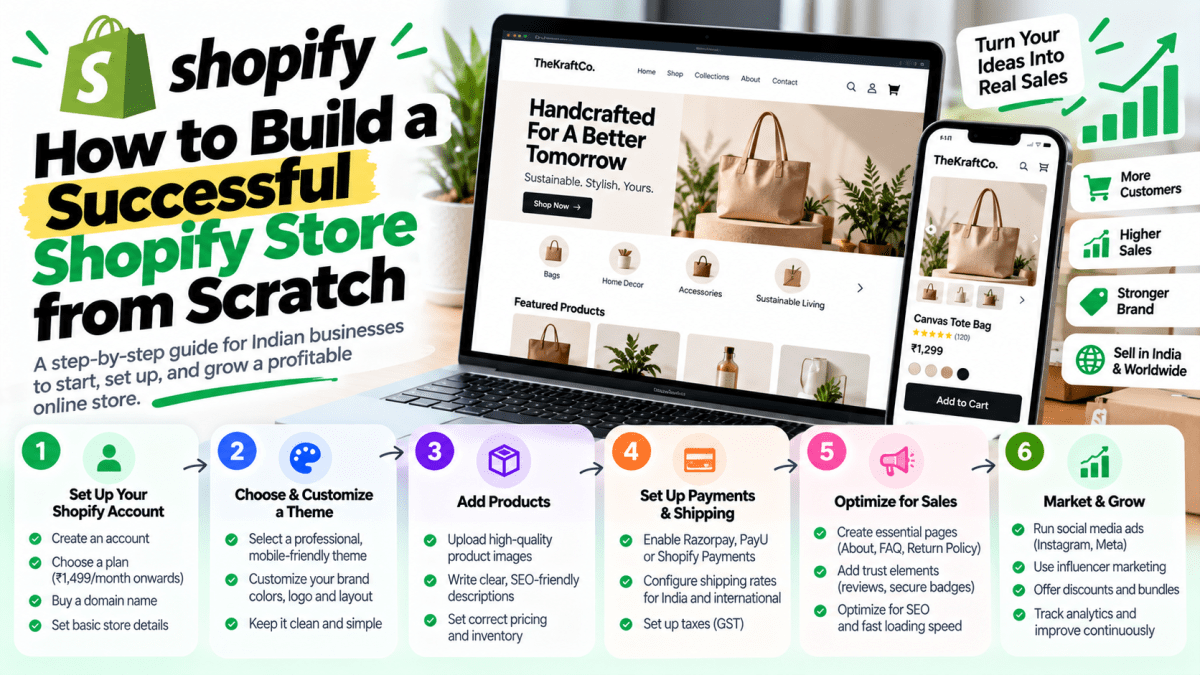
Step 5: Create Your Shopify Account#
Once the business fundamentals are clear, create your Shopify store.
During initial setup, configure basic information such as:
- Store name
- Business details
- Currency
- Location
- Contact information
- Store preferences
Use accurate business information.
Don't rush through the configuration just to get to the theme editor.
Step 6: Choose Your Shopify Plan#
Shopify offers different plans with different capabilities and pricing.
The right plan depends on:
- Business size
- Features
- Staff requirements
- Sales volume
- Reporting requirements
- Operational needs
Pricing and available features can change, so check Shopify's current plans before making a final decision.
Don't automatically choose the most expensive plan.
Choose the plan that supports your current requirements and expected growth.
Step 7: Connect Your Domain#
Your domain is your digital address.
For example:
yourbrand.com
A professional domain generally creates more trust than using a temporary platform URL.
When choosing a domain:
- Keep it short
- Make it easy to remember
- Avoid unnecessary numbers
- Avoid confusing spelling
- Keep it brandable
Your domain should ideally match your brand name.
Step 8: Choose the Right Shopify Theme#
Your theme controls much of your store's visual experience.
Don't choose a theme simply because its demo homepage looks impressive.
Evaluate:
- Mobile experience
- Product pages
- Collection pages
- Navigation
- Search
- Filters
- Cart
- Performance
- Customization
- Reviews
- Product media
Your most important page isn't necessarily the homepage.
For e-commerce, the product page often deserves the most attention.
Step 9: Design Your Store Around the Customer Journey#
A good Shopify store should guide customers logically.
A typical journey is:
Homepage → Collection → Product → Cart → Checkout
But customers may enter from different places.
Someone might arrive directly on:
Product Page
from a Google search.
Another customer might arrive on:
Landing Page
from an advertisement.
Another might discover:
Instagram → Product Page
Your website should therefore make sense even if visitors don't start on the homepage.
Step 10: Build a High-Converting Homepage#
Your homepage should immediately communicate:
What do you sell?#
Who is it for?#
Why should customers care?#
What should they do next?#
A strong structure might look like:
Hero Section#
Clear headline + supporting message + CTA.
Featured Products#
Show popular or important products.
Categories#
Help customers browse.
Benefits#
Explain what makes your brand different.
Social Proof#
Reviews and customer content.
Brand Story#
Explain who you are.
Best Sellers#
Highlight proven products.
Promotional Section#
Show relevant offers.
FAQ#
Address common objections.
Final CTA#
Give customers another reason to explore or buy.
Step 11: Create Strong Product Pages#
Product pages are where many purchases happen.
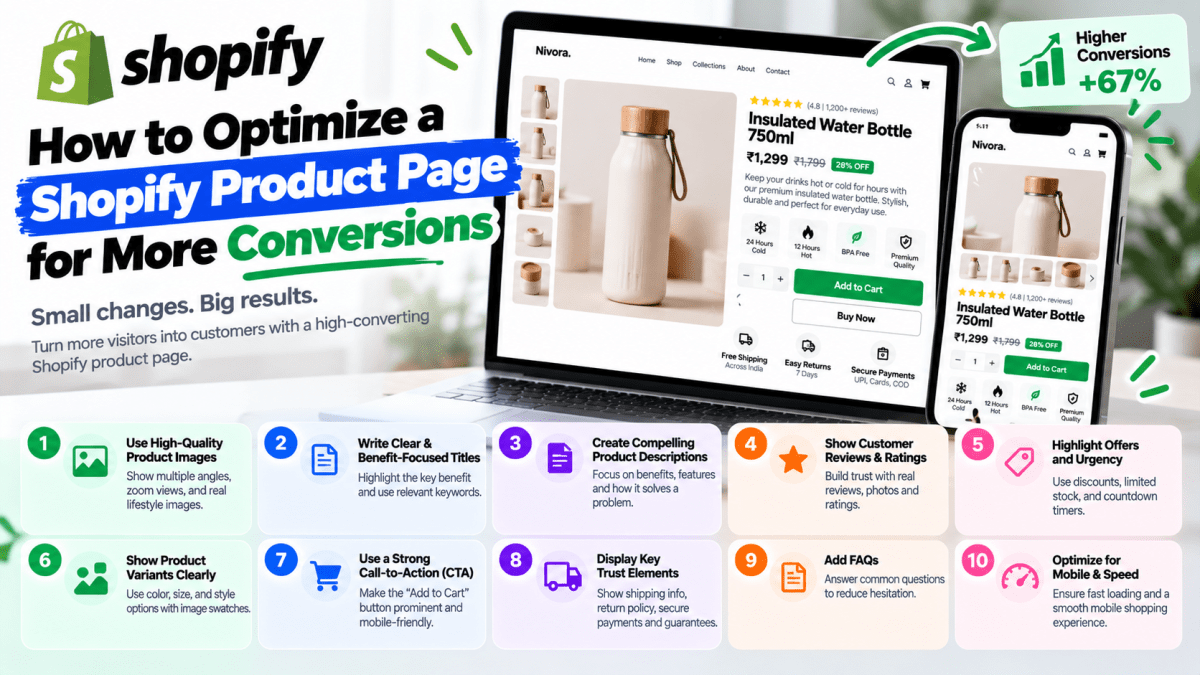
A product page should answer the customer's questions before they need to contact you.
Include:
- Product name
- Price
- Images
- Videos where useful
- Product description
- Benefits
- Specifications
- Variants
- Size information
- Availability
- Shipping information
- Return policy
- Reviews
- FAQs
- Clear CTA
Don't make customers hunt for important information.
Step 12: Invest in Product Photography#
Customers cannot physically touch your product through a website.
Your photography needs to communicate:
Quality + Size + Detail + Usage + Appearance
Depending on the product, consider:
- Front view
- Back view
- Side view
- Close-up
- Lifestyle image
- Product-in-use
- Packaging
- Scale reference
For fashion, show products on models where appropriate.
For jewellery, show scale and detail.
For furniture, show the product in a real environment.
Step 13: Write Product Descriptions That Sell#
Don't just list features.
Explain benefits.
Instead of:
100% cotton. Regular fit. Blue.
Consider:
Made from breathable cotton with a comfortable regular fit, designed for everyday wear in warm weather.
Then provide the specifications separately.
A good product description combines:
Benefit + Feature + Context
Step 14: Organize Products Into Collections#
Collections help customers browse your store.
Depending on the business, you could create collections based on:
- Category
- Gender
- Use case
- Price
- Season
- Material
- Style
- New arrivals
- Best sellers
- Sale
Don't create hundreds of meaningless collections.
Every collection should help customers find products more easily.
Step 15: Build Simple Navigation#
Your navigation should make shopping easier.
A typical structure might be:
Home
Shop
Collections
About
Contact
Search
Cart
The exact structure depends on your product catalog.
For larger stores, consider mega menus or category-specific navigation where appropriate.
On mobile, prioritize the most important shopping paths.
Step 16: Configure Shopify Payments and Other Payment Methods#
Payment options are critical.
For Indian customers, you may want to support payment methods such as:
- UPI
- Credit cards
- Debit cards
- Net banking
- Wallets
- Cash on delivery
The exact payment providers available depend on your business, location, eligibility, and current platform/provider requirements.
Before launching, test the entire payment journey.
Don't assume it works because the payment provider says the account is active.
Actually place a test order.
Step 17: Configure Cash on Delivery Carefully#
COD can increase trust for some customers.
But it also introduces risk.
Potential problems include:
- Fake orders
- RTO
- Failed delivery
- Shipping costs
- Returns
You can consider:
- COD confirmation
- OTP verification
- Customer calls
- COD fees
- Order-value limits
- Pin-code restrictions
The right strategy depends on your product and customer base.
Step 18: Configure Shipping#
Define:
- Shipping zones
- Shipping prices
- Free-shipping threshold
- Delivery estimates
- Tracking
- COD rules
- Return shipping
For India, shipping can vary significantly by:
- Pin code
- Product weight
- Product dimensions
- City
- Region
Don't promise:
"Delivery in 2 days"
unless your logistics operation can consistently deliver it.
Step 19: Create Clear Store Policies#
Your store should clearly explain:
Shipping Policy#
How products are delivered.
Return Policy#
What can be returned.
Refund Policy#
How refunds work.
Privacy Policy#
How customer data is handled.
Terms and Conditions#
The rules governing store usage.
Clear policies reduce uncertainty and can increase customer confidence.
For legal compliance, businesses should have their policies reviewed appropriately for their specific situation.
Step 20: Add Customer Reviews#
Reviews are powerful because they provide social proof.
A new visitor may think:
"Does this brand actually deliver?"
Reviews can help answer that question.
Useful review content can include:
- Rating
- Written review
- Customer name
- Product purchased
- Customer image
- Video review
Real reviews are much more valuable than generic claims like:
"Best product in India!"
Step 21: Add Trust Signals#
Customers are cautious when buying from unfamiliar brands.
Use relevant trust signals such as:
- Customer reviews
- Secure payment information
- Contact details
- Business information
- Return policy
- Shipping policy
- Customer support
- Social media presence
- Product guarantees where applicable
Don't fill your website with meaningless trust badges.
Use information that actually reduces customer uncertainty.
Step 22: Optimize Your Shopify Store for Mobile#
Your store must work well on smartphones.
Check:
- Navigation
- Search
- Product images
- Product variants
- Buttons
- Forms
- Cart
- Checkout
- Pop-ups
Mobile users should not have to pinch, zoom, or fight the interface.
A mobile-first approach should be part of the design process from the beginning.
Step 23: Optimize Shopify Store Speed#
Store speed affects user experience.
Potential problems include:
- Huge images
- Too many apps
- Heavy theme code
- Excessive scripts
- Large videos
- Unnecessary animations
- Tracking scripts
Improve performance by:
- Compressing images
- Using appropriate image dimensions
- Removing unnecessary apps
- Reviewing third-party scripts
- Using efficient theme code
- Reducing unnecessary visual effects
Don't optimize blindly.
Measure performance before and after changes.
Step 24: Be Careful With Shopify Apps#
Apps are useful.
They can provide:
- Reviews
- Email marketing
- Loyalty
- Subscriptions
- Product bundles
- Search
- Analytics
- Customer support
But don't install an app simply because it looks interesting.
Every app can introduce:
- Additional cost
- Scripts
- Data dependencies
- Maintenance
- Potential conflicts
Ask:
Does this app directly solve a meaningful business problem?
If not, don't install it.
Step 25: Set Up Shopify SEO#
SEO should be built into the store from the beginning.
Optimize:
Product Pages#
- Product title
- Description
- Images
- Alt text
- Relevant keywords
Collection Pages#
- Collection name
- Description
- Metadata
- Internal links
Blog#
Create useful educational content.
Site Architecture#
Make important pages easy to discover.
Technical SEO#
Monitor:
- Indexing
- Crawlability
- Redirects
- Canonicalization
- Broken links
- Duplicate content
SEO isn't a one-time setup.
It's an ongoing growth channel.
Step 26: Build a Shopify Content Strategy#
Don't publish content just for the sake of publishing.
Create content around customer questions.
For example, a jewellery brand could publish:
How to Choose Jewellery for Different Occasions
Gold vs Silver: Which Should You Buy?
How to Care for Your Jewellery
Jewellery Gift Guide
These articles can attract customers before they're ready to buy.
Then link them to relevant products and collections.
Step 27: Set Up Analytics#
Before launching, install and configure the analytics systems relevant to your business.
You should understand:
- Where traffic comes from
- Which products people view
- What gets added to cart
- Where customers abandon
- What generates sales
- Which campaigns generate revenue
Track meaningful events.
Don't install analytics and never look at the data.
Step 28: Connect Your Marketing Channels#
Your Shopify store should connect with your acquisition strategy.
Potential channels include:
- YouTube
- Influencers
- SEO
- Affiliate marketing
Each channel may require different landing pages and tracking.
Step 29: Set Up Meta Ads Correctly#
If you're selling products through Instagram and Facebook, your advertising infrastructure should be properly configured.
Depending on your setup, this may involve:
- Meta Business account
- Product catalog
- Pixel
- Conversion tracking
- Domain verification
- Event configuration
- Product feed
The goal is to understand:
Which advertising activity produces actual purchases?
Not simply:
Which ad gets the most clicks?
Step 30: Set Up Google Shopping Where Appropriate#
For product-based businesses, Google can be an important acquisition channel.
Depending on your market and eligibility, product feeds can help products appear in relevant shopping experiences.
Make sure your product information is accurate.
Pay particular attention to:
- Product titles
- Descriptions
- Prices
- Availability
- Images
- Brand information
- Product identifiers where required
Step 31: Create an Abandoned Cart Strategy#
Not every visitor who adds a product to cart will purchase immediately.
Some may:
- Compare products
- Wait for a discount
- Get distracted
- Need approval
- Have payment issues
A properly configured abandoned-cart strategy can recover some otherwise lost purchases.
Potential channels include:
- On-site reminders
- Other permitted customer communication channels
Don't spam customers.
Use appropriate consent and messaging practices.
Step 32: Create a Customer Retention Strategy#
The first purchase is only the beginning.
Depending on your product, encourage repeat purchases through:
- Loyalty programs
- Product education
- Personalized recommendations
- New product launches
- Customer-exclusive offers
Acquiring a customer can be expensive.
Increasing customer lifetime value can make the economics of the business much stronger.
Step 33: Track Your E-commerce Funnel#
A basic funnel might look like:
10,000 Visitors
↓
3,000 Product Views
↓
500 Add to Cart
↓
250 Checkout
↓
150 Purchases
Now you can ask:
Where is the biggest problem?
If product views are low:
Improve navigation and product discovery.
If add-to-cart is low:
Improve product pages and offers.
If checkout initiation is high but purchases are low:
Investigate checkout, payment, shipping, or trust.
This is far more useful than simply saying:
"Sales are low."
Step 34: Calculate Your Unit Economics#
This is where many e-commerce businesses make mistakes.
Suppose a product sells for:
₹1,499
But your costs are:
- Product: ₹500
- Packaging: ₹50
- Shipping: ₹100
- Payment fees: ₹30
- Returns/RTO allowance: ₹100
- Advertising: ₹400
Your actual contribution is very different from the headline selling price.
Before scaling advertising, understand:
- Gross margin
- Contribution margin
- Customer acquisition cost
- Average order value
- Return rate
- Repeat purchase rate
Revenue isn't profit.
Step 35: Increase Average Order Value#
One way to improve store economics is to increase average order value.
Strategies can include:
Bundles#
Buy related products together.
Quantity discounts#
For example:
Buy 2 → Save 10%
Free shipping threshold#
For example:
Free shipping above ₹999
Cross-selling#
Recommend related products.
Upselling#
Offer a premium alternative.
But don't push irrelevant products.
Recommendations should make sense.
Step 36: Create Offers Carefully#
Discounts can increase sales, but constant discounts can damage your brand.
Instead of always running:
50% OFF
consider strategic offers such as:
- First-order discount
- Bundle discount
- Seasonal offer
- Limited launch offer
- Free shipping threshold
- Loyalty reward
The goal is to create a compelling reason to buy without training customers to wait for discounts.
Step 37: Test Your Shopify Store Before Launch#
Before going live, test the entire customer journey.
Homepage#
- Does the message make sense?
Navigation#
- Can customers find products?
Product pages#
- Are all details visible?
Cart#
- Can products be added and removed?
Checkout#
- Does everything work?
Payment#
- Can an order actually be completed?
Shipping#
- Are shipping charges correct?
Email#
- Do order notifications work?
Mobile#
- Does everything work on smartphones?
Policies#
- Are the pages accessible?
Never launch a store without placing test orders.
Step 38: Launch in Phases#
You don't need every possible feature on day one.
A practical launch might include:
Phase 1#
- Store
- Products
- Payments
- Shipping
- Essential policies
- Analytics
Phase 2#
- SEO content
- Email marketing
- Reviews
- Retargeting
- Better product photography
Phase 3#
- Loyalty
- Advanced automation
- Personalization
- Advanced integrations
This keeps the initial launch focused.
Step 39: Don't Stop at Launch#
This is one of the biggest differences between a store and a successful store.
After launch, monitor:
- Sales
- Conversion rate
- Product performance
- Add-to-cart rate
- Checkout abandonment
- Customer feedback
- Return rate
- Advertising performance
Then improve the store.
A successful Shopify business is continuously optimized.
Step 40: Use Customer Feedback#
Ask customers:
- What almost stopped you from buying?
- What information was missing?
- Was checkout easy?
- Was delivery as expected?
- How did you discover us?
- What products would you like?
Customer feedback can reveal problems analytics can't fully explain.
Common Shopify Store Mistakes#
Mistake 1: Starting With Design#
A beautiful website cannot fix a bad product.
Mistake 2: Using Generic Product Images#
Your products become difficult to evaluate.
Mistake 3: Weak Product Descriptions#
Customers don't understand the value.
Mistake 4: Too Many Apps#
The store becomes expensive and potentially slower.
Mistake 5: Ignoring Mobile#
You create friction for smartphone users.
Mistake 6: No Reviews#
Customers have little social proof.
Mistake 7: Hidden Shipping Information#
Unexpected charges cause abandonment.
Mistake 8: No Analytics#
You can't identify the problems.
Mistake 9: Depending Only on Ads#
You need a broader acquisition strategy.
Mistake 10: No Retention Strategy#
You spend money acquiring customers and then ignore them.
Mistake 11: Constant Discounts#
Your customers learn to wait.
Mistake 12: No Clear Differentiation#
You become another store selling another product.
Shopify Store Launch Checklist#
Before going live, use this checklist.
Business#
- [ ] Target customer defined
- [ ] Pricing finalized
- [ ] Margins calculated
- [ ] Product positioning clear
Branding#
- [ ] Logo
- [ ] Brand colors
- [ ] Typography
- [ ] Brand messaging
Store#
- [ ] Homepage
- [ ] Navigation
- [ ] Collections
- [ ] Product pages
- [ ] Cart
- [ ] Search
Products#
- [ ] Product names
- [ ] Descriptions
- [ ] Images
- [ ] Prices
- [ ] Variants
- [ ] Inventory
Payments#
- [ ] Payment provider connected
- [ ] UPI where applicable
- [ ] Cards
- [ ] COD where appropriate
- [ ] Test purchase completed
Shipping#
- [ ] Shipping rates
- [ ] Delivery estimates
- [ ] Tracking
- [ ] COD rules
Policies#
- [ ] Privacy policy
- [ ] Terms
- [ ] Shipping policy
- [ ] Return/refund policy
SEO#
- [ ] Page titles
- [ ] Meta descriptions
- [ ] Product optimization
- [ ] Collection optimization
- [ ] Image alt text
- [ ] Internal links
- [ ] Sitemap/indexing reviewed
Performance#
- [ ] Images optimized
- [ ] Apps reviewed
- [ ] Mobile tested
- [ ] Third-party scripts reviewed
Analytics#
- [ ] Analytics connected
- [ ] Purchase tracking
- [ ] Advertising tracking
- [ ] Conversion events tested
Marketing#
- [ ] Retargeting strategy
How Much Does It Cost to Build a Shopify Store?#
The cost depends on how much you want to customize.
A rough development range in India might be:
Basic Shopify Setup#
₹15,000–₹30,000
Suitable for relatively simple stores.
Professional Shopify Store#
₹30,000–₹60,000
May include better customization, product setup, payment/shipping configuration, SEO basics, and mobile optimization.
Custom Shopify Store#
₹60,000–₹1,50,000+
Suitable for businesses requiring more extensive UI/UX customization and functionality.
Advanced Shopify Development#
₹1,00,000–₹3,00,000+
For complex integrations, custom functionality, larger catalogs, or sophisticated commerce requirements.
These are development estimates rather than Shopify's own subscription prices.
You should also budget for:
- Shopify subscription
- Domain
- Paid apps
- Payment processing
- Shipping
- Product photography
- Content
- Marketing
- Ongoing maintenance
How Long Does It Take to Build a Shopify Store?#
A simple store may be launched within:
1–2 weeks
A professional customized store may take:
2–4 weeks
An advanced store can take:
4–8+ weeks
The timeline depends on:
- Number of products
- Design requirements
- Custom functionality
- Integrations
- Content readiness
- Client feedback
- Testing
A delayed content delivery can slow development significantly.
Prepare your:
- Product information
- Images
- Prices
- Policies
- Branding
- Content
before development starts.
Shopify Store vs Custom E-commerce Website#
You don't always need custom e-commerce development.
Shopify is often the better choice when you want:
- Faster launch
- Managed infrastructure
- Lower technical complexity
- E-commerce functionality
- Easy store management
Custom development becomes more attractive when you require:
- Unique workflows
- Complex pricing
- Advanced customer portals
- Specialized integrations
- Custom marketplaces
- Highly unusual business logic
Choose custom technology because you need it—not because it sounds more advanced.
How Stitchbyte Builds Shopify Stores#
At Stitchbyte, we approach Shopify development as an e-commerce growth project rather than simply a website setup.
Our process can include:
Business Strategy#
Understanding:
- Products
- Customers
- Competitors
- Pricing
- Positioning
UI/UX#
Designing:
- Homepage
- Product pages
- Collections
- Navigation
- Cart
- Mobile experience
Shopify Development#
Implementing:
- Theme customization
- Custom sections
- Product structure
- Collections
- Navigation
- Store functionality
E-commerce Setup#
Configuring:
- Payments
- Shipping
- COD
- Products
- Inventory
- Policies
SEO#
Optimizing:
- Products
- Collections
- Metadata
- Internal links
- Content
- Technical structure
Conversion Optimization#
Improving:
- Product presentation
- CTAs
- Reviews
- Trust
- Offers
- Customer journey
Marketing Infrastructure#
Connecting appropriate:
- Meta
- Analytics
- Customer communication
The objective is straightforward:
Build a Shopify store that is ready to sell—not merely ready to launch.
Final Thoughts#
Building a Shopify store from scratch is technically easier than building an e-commerce platform from scratch.
But technical simplicity doesn't guarantee business success.
A successful Shopify store requires the right combination of:
Product + Brand + Website + Trust + Marketing + Operations + Optimization
Your store should make it easy for customers to:
Discover you → Understand your product → Trust your brand → Buy confidently → Return again
If you focus only on launching the website, you'll have a Shopify store.
If you focus on the complete customer journey, you can build a business.
And that's the difference.
Frequently Asked Questions#
Can I build a Shopify store myself?#
Yes. Shopify is designed to allow non-technical users to create and manage stores. However, professional development can be valuable when you need custom design, integrations, advanced functionality, SEO, performance optimization, or conversion-focused UX.
How much does it cost to build a Shopify store in India?#
Development costs vary significantly. Basic setup may start around ₹15,000–₹30,000, while professional customized stores can cost ₹30,000–₹60,000 or more. Advanced projects can cost ₹1 lakh or significantly more depending on requirements.
How long does it take to build a Shopify store?#
A basic store may take around one to two weeks. A customized store can take two to four weeks, while complex projects may require several weeks or longer.
Is Shopify good for Indian businesses?#
Yes. Shopify can work well for Indian D2C brands, fashion businesses, jewellery stores, beauty brands, lifestyle businesses, and many other product-based companies.
Can Shopify accept UPI?#
Indian merchants can use supported payment providers that offer UPI, subject to eligibility and current provider and Shopify requirements.
Can I offer Cash on Delivery?#
Yes. COD can be configured for Shopify stores, although businesses should consider RTO, failed deliveries, verification, and operational costs.
How many products can I add to Shopify?#
Shopify can support substantial product catalogs. The practical considerations become product organization, variants, search, filtering, inventory management, and store performance as the catalog grows.
Do I need a Shopify developer?#
You don't necessarily need one for a basic store. A developer becomes more useful when you need custom UI/UX, theme development, integrations, advanced functionality, performance optimization, or a professional conversion-focused store.
How do I get traffic to my Shopify store?#
Potential channels include:
- SEO
- Google Ads
- Meta Ads
- Influencer marketing
- YouTube
- Content marketing
- Affiliate marketing
The best combination depends on your product and target customer.
How do I increase Shopify sales?#
Start by analyzing the funnel:
Traffic → Product Views → Add to Cart → Checkout → Purchase
Then identify where customers drop off.
Improve product pages, trust, pricing, shipping information, mobile UX, checkout, offers, and marketing based on the data.
Is Shopify good for SEO?#
Yes, Shopify can provide a strong SEO foundation. However, organic growth requires keyword research, useful content, technical SEO, optimized products and collections, internal linking, authority, and ongoing optimization.
Should I use a free Shopify theme?#
A free theme can be perfectly suitable for some businesses. The important thing is whether it provides the user experience and functionality your business requires.
How many Shopify apps should I install?#
There is no ideal number. Install only apps that solve meaningful business problems. Too many apps can increase costs, complexity, and potentially affect performance.
Should I run ads immediately after launching?#
You can, but don't rush into scaling advertising before testing your store. Make sure payments, shipping, product pages, analytics, mobile UX, and conversion tracking work correctly first.
Does a Shopify store guarantee sales?#
No.
Shopify provides the technology.
Sales depend on your product, market, pricing, positioning, marketing, customer experience, trust, and execution.
Ready to Build Your Shopify Store?#
You don't need another generic online store.
You need an e-commerce website that represents your brand, makes your products look valuable, builds customer trust, and makes purchasing easy.
Stitchbyte helps businesses design, develop, optimize, and launch Shopify stores built around real business goals.
From Shopify setup and custom design to product pages, payment integration, shipping, SEO, analytics, and conversion optimization, we can help you build your store from the ground up.
Stitchbyte — Let's Build Something Extraordinary.
Planning a Custom Website or Web App in 2026?
Avoid agency markups and hidden renewal fees. Speak with our lead architects for a transparent, itemized scope and architectural proposal tailored to your business goals.
Enjoyed this article?
Share it with your teammates or network.
StitchByte Team
AuthorPublished by the StitchByte engineering & design team. We build high-performance web applications, AI automation agents, and modern digital platforms for scaling businesses across India and globally.