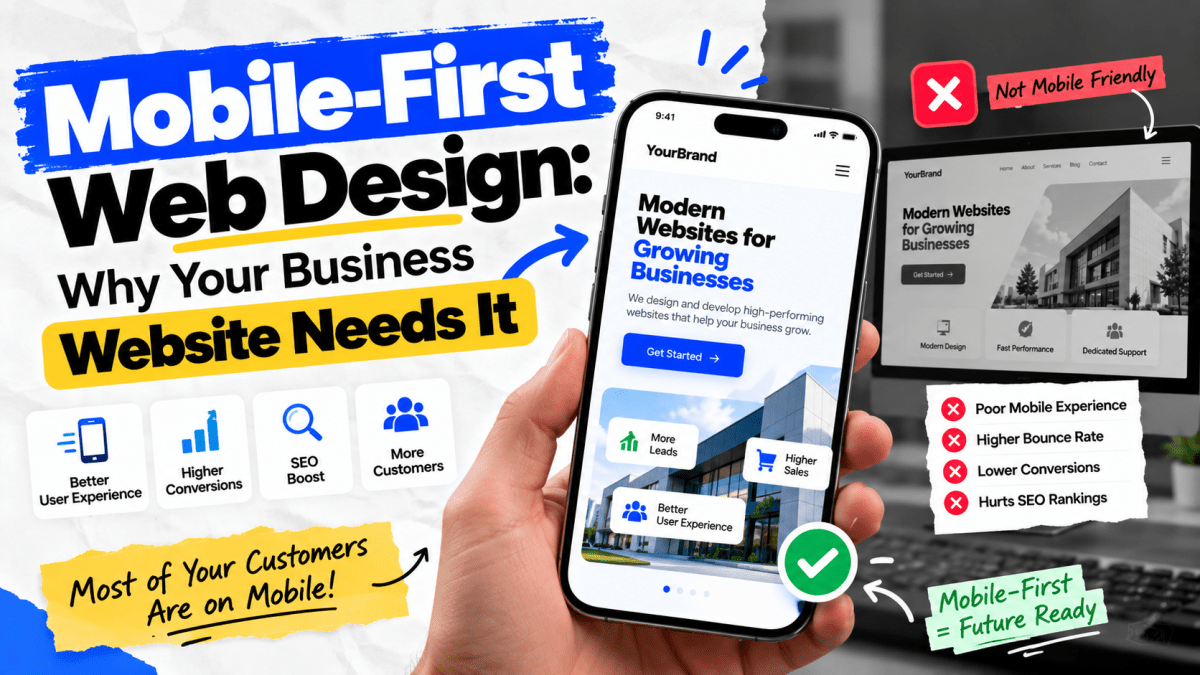
Mobile-First Web Design: Why Your Business Website Needs It#
If your business website looks great on a desktop but feels difficult to use on a smartphone, you may be losing customers without even realizing it.
Today, people search for businesses, compare products, read reviews, check prices, contact companies, book appointments, and make purchases directly from their phones. For many businesses, the smartphone is no longer a secondary screen. It is the primary way customers discover and interact with the brand.
That is why mobile-first web design has become an essential part of modern website development.
Mobile-first design means creating the website experience for smaller screens and mobile users first, then progressively enhancing the experience for tablets and desktops.
It is not simply about making a desktop website responsive.
It is about asking a more important question:
If most of your customers visit your website from a smartphone, is the website actually designed around their needs?
For businesses investing in a new website or redesign, the answer can have a direct impact on user experience, SEO, leads, sales, and brand credibility.
In this guide, we'll explain what mobile-first web design means, why it matters, how it affects SEO and conversions, common mistakes businesses make, and how to determine whether your website needs a mobile-first redesign.
What Is Mobile-First Web Design?#
Mobile-first web design is a design approach where the website is planned and built primarily for mobile devices before expanding the experience to larger screens.
Instead of starting with a large desktop layout and trying to squeeze everything onto a smartphone, designers start with the smallest practical screen size.
The process generally looks like this:
Mobile → Tablet → Laptop → Desktop
The design starts by prioritizing the most important information and actions.
For example, a business website might prioritize:
- Business name
- Main value proposition
- Primary service
- Call button
- WhatsApp button
- Contact form
- Location
- Reviews
- Product/service information
- Important calls-to-action
Less important visual elements can then be introduced as screen size increases.
Mobile-first vs desktop-first#
A traditional desktop-first approach might work like this:
Desktop design → tablet adaptation → mobile adaptation
Mobile-first reverses the process:
Mobile design → tablet enhancement → desktop enhancement
This forces businesses and designers to focus on what actually matters.
And that's a good thing.
Why Mobile-First Design Matters for Businesses#
Mobile-first design isn't just a design trend.
It directly affects how customers experience your business online.
Consider a potential customer searching for a service.
They find your website on Google.
They click the result.
The page takes too long to load.
The text is tiny.
The menu is difficult to use.
The buttons are too small.
The contact form is annoying.
The customer leaves.
Your competitor gets the enquiry.
You may never know that this happened.
This is why mobile website experience should be treated as a business and conversion issue, not simply a technical issue.
1. Your Customers Are Already Using Mobile Devices#
Smartphones have become one of the primary tools people use to access the internet.
Customers use mobile devices to:
- Search Google
- Discover local businesses
- Compare services
- View products
- Read reviews
- Contact businesses
- Send WhatsApp messages
- Make purchases
- Book appointments
- Find directions
- Check social media
- Research companies before making decisions
For businesses, this means the mobile experience can be the first interaction a potential customer has with the brand.
If that experience is poor, the customer may never reach your sales team.
2. Mobile Users Have Different Needs#
Someone browsing your website on a desktop may have a large screen, keyboard, mouse, and plenty of space.
A mobile user doesn't.
They may be:
- Walking
- Travelling
- Sitting in a café
- Searching between meetings
- Using one hand
- Operating on a slow connection
- Looking for a specific piece of information
This changes how a website should be designed.
A mobile user may want to answer a question within seconds:
What does this company do?
How much does it cost?
Where are they located?
Can I call them?
Can I WhatsApp them?
Can I buy this product?
Can I book an appointment?
A mobile-first website should make these actions easy.
3. Mobile-First Design Improves User Experience#
User experience is one of the most important components of a successful website.
A mobile-first website should make navigation intuitive.
For example, instead of presenting a complicated navigation menu with 15 different options, a mobile website might use:
- Home
- Services
- About
- Portfolio
- Contact
with a clear menu button.
Important actions can be highlighted through strategically placed buttons.
For example:
Get a Quote
Call Now
WhatsApp Us
Book Appointment
Shop Now
The goal is not to make the website look empty.
The goal is to remove unnecessary friction.
4. Mobile-First Design Can Improve Conversions#
A beautiful website isn't necessarily a high-converting website.
Conversion happens when visitors take the action your business wants.
That could be:
- Filling out a form
- Calling your business
- Sending a WhatsApp message
- Buying a product
- Booking an appointment
- Requesting a quote
- Downloading a brochure
- Signing up for a service
Mobile-first design makes these actions easier to complete.
Example#
Imagine a construction company website.
A desktop visitor might explore:
Services → Projects → About → Testimonials → Contact
A mobile visitor may simply want:
Get a Free Quote
If the quote button is difficult to find, the business may lose the lead.
A mobile-first approach places the most important conversion actions where users can easily access them.
5. Mobile-First Design Helps Reduce Unnecessary Content#
One of the biggest benefits of designing for mobile first is that it forces businesses to prioritize content.
Desktop screens provide plenty of space.
That often encourages businesses to add:
- Large paragraphs
- Multiple banners
- Excessive animations
- Huge image sections
- Multiple navigation options
- Unnecessary graphics
- Repeated information
Mobile screens expose these problems immediately.
When designing mobile first, you have to ask:
Does the customer actually need this?
If the answer is no, remove it.
This often results in a cleaner website across every device.
6. Mobile Performance Matters#
Mobile users may not always have the same internet connection or device performance as desktop users.
A website filled with:
- Large images
- Heavy JavaScript
- Unoptimized videos
- Excessive animations
- Unnecessary third-party scripts
- Poorly optimized fonts
can become slow.
And slow websites create friction.
A good mobile-first development process therefore considers performance from the beginning.
Instead of building a heavy website and optimizing it later, performance becomes part of the architecture.
7. Mobile-First Design Supports Better SEO#
Mobile experience is an important part of modern SEO.
Google uses mobile-first indexing, meaning the mobile version of a website is generally the version Google uses for indexing and ranking.
That makes it important for businesses to ensure that their mobile experience contains the same important content and structured information as their desktop experience.
A website that performs poorly on mobile can create problems beyond aesthetics.
Issues may include:
- Difficult navigation
- Poor readability
- Slow loading
- Missing content
- Poor internal linking
- Difficult interactions
- Weak user experience
SEO is no longer just about inserting keywords into pages.
Technical quality and user experience matter too.
8. Mobile-First Design and Core Web Vitals#
Mobile-first design should also consider website performance metrics such as Core Web Vitals.
The three primary Core Web Vitals are:
Largest Contentful Paint — LCP#
Measures loading performance.
A good LCP experience is generally 2.5 seconds or less.
Interaction to Next Paint — INP#
Measures how quickly a page responds to user interactions.
A good INP is generally 200 milliseconds or less.
Cumulative Layout Shift — CLS#
Measures unexpected visual movement while a page loads.
A good CLS is generally 0.1 or less.
These metrics are especially relevant to mobile users because mobile devices and networks can expose performance problems more quickly.
However, Core Web Vitals shouldn't be treated as a magic SEO score.
A perfect performance score doesn't automatically mean your website will rank.
The bigger goal is to create a website that is:
- Fast
- Stable
- Responsive
- Accessible
- Easy to navigate
- Useful to visitors
9. Mobile-First Design Is Critical for Local Businesses#
Mobile-first design is particularly important for local businesses.
Imagine someone searching:
"Best salon near me"
or:
"website developer near me"
or:
"dentist in Jaipur"
That person is likely looking for immediate information.
They may want to:
- Call
- Get directions
- Check opening hours
- Read reviews
- View services
- Send a message
- Book an appointment
A mobile-first website can make these actions extremely easy.
For local businesses, prominent contact information and location-based actions can significantly improve usability.
10. Mobile-First Design Is Essential for E-commerce#
For e-commerce businesses, mobile UX can directly influence revenue.
Customers need to be able to:
- 1Find products
- 2View images
- 3Understand product details
- 4Select variants
- 5Add products to cart
- 6Enter shipping details
- 7Select payment
- 8Complete checkout
If any of these steps becomes difficult on mobile, customers may abandon the purchase.
Common mobile e-commerce problems#
- Tiny product images
- Difficult filters
- Complicated menus
- Too many pop-ups
- Long checkout forms
- Poor product descriptions
- Difficult coupon fields
- Slow product pages
- Payment problems
- Buttons that are difficult to tap
A mobile-first e-commerce strategy addresses these issues before they become conversion problems.
11. Navigation Should Be Designed for Thumbs#
Desktop websites are usually operated with a mouse.
Mobile websites are often operated with fingers.
That difference matters.
Interactive elements should be large enough to tap comfortably.
For example:
Bad mobile experience
Learn More | View Details | Buy Now
with tiny links positioned close together.
Better experience
Large, clearly separated buttons with enough spacing.
This reduces accidental taps and makes the interface easier to use.
12. Typography Matters More on Mobile#
Text that looks comfortable on a large desktop monitor may become difficult to read on a smartphone.
Mobile-first typography should consider:
- Font size
- Line height
- Paragraph width
- Heading hierarchy
- Contrast
- Spacing
- Font loading performance
Long paragraphs should generally be broken into smaller sections.
Instead of presenting a giant wall of text, use:
- Short paragraphs
- Headings
- Bullet points
- Highlighted information
- Cards
- Visual hierarchy
This makes content easier to scan.
13. Mobile Forms Should Be Simple#
Forms are one of the biggest conversion opportunities—and one of the biggest sources of friction.
Suppose your website has a lead form asking for:
- Full name
- Phone
- Company
- Address
- City
- State
- Website
- Budget
- Business type
- Message
That's a lot of work for a mobile visitor.
Do you really need all of that information before speaking to the lead?
Probably not.
A better initial form might ask for:
Name
Phone/Email
Requirement
Submit
You can collect additional information later.
Rule:#
Every unnecessary form field creates another opportunity for the user to leave.
14. WhatsApp Integration Is Particularly Useful for Indian Businesses#
For many Indian businesses, WhatsApp is an important communication channel.
Instead of forcing mobile users to complete a lengthy contact form, businesses can provide a direct WhatsApp option.
For example:
Chat on WhatsApp
This can be particularly useful for:
- Local services
- Real estate
- Agencies
- Restaurants
- Clinics
- Salons
- Consultants
- Home services
- E-commerce
- Education businesses
The important thing is to make the experience natural rather than covering every page with intrusive pop-ups.
15. Mobile-First Does Not Mean Mobile-Only#
This is an important distinction.
Mobile-first does not mean ignoring desktop users.
It means prioritizing the mobile experience first and then enhancing the design for larger screens.
A good website should still work beautifully on:
- Smartphones
- Tablets
- Laptops
- Desktop monitors
- Large displays
The layout should adapt intelligently.
For example:
Mobile#
One-column layout.
Tablet#
Two-column layout where appropriate.
Desktop#
Multi-column layout with expanded navigation and additional visual elements.
The content remains consistent, but the presentation changes based on screen size.
Mobile-First vs Responsive Web Design#
These terms are often used interchangeably, but they're not exactly the same.
Responsive web design#
Responsive design means the website layout adapts to different screen sizes.
For example:
Desktop → Tablet → Mobile
Elements resize or rearrange based on the available screen.
Mobile-first design#
Mobile-first is an approach to designing and developing that starts with the mobile experience and progressively enhances it.
You can have a responsive website that was designed desktop-first.
You can also build a responsive website using a mobile-first approach.
The strongest modern approach is generally:
Responsive + mobile-first
Common Mobile Website Mistakes#
Many businesses have websites that technically work on mobile but still provide a poor experience.
Here are some common problems.
1. Tiny text#
Users have to zoom in to read content.
2. Small buttons#
Users struggle to tap the correct action.
3. Desktop navigation#
A complicated desktop menu is simply squeezed onto mobile.
4. Huge images#
Large images slow down page loading.
5. Autoplay videos#
Videos consume bandwidth and can create performance issues.
6. Too many pop-ups#
Visitors constantly have to close promotional windows.
7. Long forms#
Users abandon the form before submitting it.
8. Poor contrast#
Text becomes difficult to read.
9. Horizontal scrolling#
The website extends beyond the screen.
10. Broken layouts#
Cards, images, tables, or buttons overlap.
11. Too many animations#
Animations can distract users and affect performance.
12. Missing mobile CTAs#
Users can't quickly find the action they need.
How to Make a Website Mobile-Friendly#
If you're developing a new website, mobile experience should be considered from the beginning.
Here's a practical process.
Step 1: Identify your most important user actions#
Ask:
What do we want visitors to do?
For example:
- Call
- Buy
- Book
- Contact
- Request a quote
Prioritize these actions.
Step 2: Design the mobile structure#
Create the mobile wireframe first.
Determine:
- Header
- Navigation
- Hero section
- Content structure
- CTA
- Forms
- Footer
Step 3: Optimize content#
Remove unnecessary content.
Rewrite long paragraphs.
Make headings clear.
Prioritize important information.
Step 4: Optimize images#
Use appropriately sized images.
Modern image formats can help reduce unnecessary payload.
Step 5: Optimize fonts#
Avoid loading unnecessary font families and weights.
Step 6: Minimize unnecessary JavaScript#
Every script has a potential performance cost.
Only load what the website actually needs.
Step 7: Test interactions#
Check:
- Buttons
- Forms
- Menus
- Sliders
- Filters
- Checkout
- Search
- Dropdowns
Step 8: Test real devices#
Don't rely exclusively on desktop browser resizing.
Test on actual smartphones where possible.
Step 9: Measure performance#
Use appropriate performance tools and real-user data where available.
Step 10: Test conversion paths#
Ask:
Can a visitor become a lead or customer without frustration?
That's the test that matters.
Mobile-First Website Checklist#
Before launching a website, check the following.
Design#
- [ ] Layout works on mobile
- [ ] Text is readable
- [ ] Buttons are easy to tap
- [ ] Navigation is simple
- [ ] No horizontal scrolling
- [ ] Important information appears early
- [ ] CTAs are visible
Performance#
- [ ] Images are optimized
- [ ] Unnecessary scripts removed
- [ ] Fonts optimized
- [ ] Heavy animations minimized
- [ ] Pages load quickly
- [ ] Core Web Vitals monitored
Conversion#
- [ ] Contact button is easy to find
- [ ] WhatsApp/call option where relevant
- [ ] Forms are short
- [ ] Checkout is simple
- [ ] CTAs are clear
- [ ] Trust signals are visible
SEO#
- [ ] Mobile content is complete
- [ ] Titles and descriptions are optimized
- [ ] Internal links work
- [ ] Structured data is implemented where appropriate
- [ ] Images have appropriate alt text
- [ ] Pages are crawlable
- [ ] Performance is monitored
How to Know If Your Website Needs a Mobile Redesign#
Your website may need a mobile-first redesign if:
1. Most visitors use mobile devices#
Check your analytics.
If mobile represents a significant percentage of traffic but conversions remain low, investigate the mobile experience.
2. Your bounce or engagement metrics are poor#
Poor mobile UX may cause visitors to leave quickly.
Don't assume the problem is always traffic quality.
The website itself could be the problem.
3. Your website requires zooming#
That's a clear usability problem.
4. Your forms are difficult to complete#
Especially if you're generating leads through mobile advertising.
5. Your website loads slowly#
Performance problems can hurt user experience.
6. Your mobile conversion rate is much lower#
Compare mobile and desktop conversion rates.
A significant difference deserves investigation.
7. Your website was built years ago#
Older websites often weren't designed around today's mobile expectations.
8. Your competitors provide a better mobile experience#
Customers compare businesses.
Your website doesn't exist in isolation.
Mobile-First Design for Different Types of Businesses#
Different businesses need different mobile experiences.
Service Businesses#
Prioritize:
- Services
- Pricing
- Reviews
- Contact
- Call
- Location
E-commerce Businesses#
Prioritize:
- Product discovery
- Search
- Filters
- Product images
- Product information
- Cart
- Checkout
Restaurants#
Prioritize:
- Menu
- Location
- Opening hours
- Reservation
- Ordering
- Call/WhatsApp
Real Estate#
Prioritize:
- Property listings
- Images
- Price
- Location
- Features
- Enquiry
- Call
Clinics#
Prioritize:
- Services
- Doctors
- Availability
- Location
- Appointment booking
- Contact
SaaS Companies#
Prioritize:
- Product value proposition
- Features
- Pricing
- Demo
- Signup
- Login
The point is simple:
Mobile-first design should be based on user intent, not just screen size.
Mobile-First Design and Paid Advertising#
There's another reason mobile-first design matters.
If you're running Meta Ads or Google Ads, a significant portion of your traffic may arrive from smartphones.
Imagine spending ₹15,000 on advertising and sending all that traffic to a website that:
- Loads slowly
- Has poor mobile UX
- Doesn't clearly explain the offer
- Has a difficult form
- Doesn't have a clear CTA
You're not necessarily facing an advertising problem.
You may have a landing-page problem.
Before increasing your advertising budget, make sure the destination experience is capable of converting the traffic.
Mobile-First Landing Pages#
A mobile-first landing page should usually have a very clear structure:
1. Strong headline#
Tell visitors what you're offering.
2. Supporting message#
Explain the benefit.
3. Primary CTA#
Give them a clear next action.
4. Trust signals#
Show:
- Reviews
- Client logos
- Certifications
- Results
- Testimonials
5. Benefits#
Explain why the customer should choose you.
6. Proof#
Show real work, case studies, or outcomes.
7. FAQ#
Remove common objections.
8. Final CTA#
Give users another opportunity to convert.
On mobile, every section should be easy to scan.
Mobile-First Design Is About Business Outcomes#
It's easy to think about mobile-first design in terms of:
"Does the website fit the phone screen?"
That's only the beginning.
The better question is:
"Can a mobile visitor easily understand, trust, and take action with this business?"
That's the real objective.
A successful mobile-first website should help users:
Discover → Understand → Trust → Act
If any stage is difficult, conversion suffers.
Should You Build a New Website or Redesign Your Existing One?#
This depends on the condition of your current website.
Build a new website if:#
- The existing technology is outdated
- The structure is fundamentally poor
- The website is difficult to maintain
- SEO architecture is weak
- The design doesn't represent your brand
- Mobile UX is severely broken
Redesign if:#
- The technology is still usable
- Your content is valuable
- Your branding is established
- Only the UX/design needs improvement
Optimize if:#
- The website is structurally sound
- Mobile issues are relatively minor
- Performance is the primary problem
- Conversion paths can be improved without rebuilding everything
Don't rebuild a website simply because it looks old.
Diagnose the problem first.
How Stitchbyte Approaches Mobile-First Website Development#
At Stitchbyte, we don't believe a website should simply "work on mobile."
It should be designed around the customer journey.
Our approach focuses on:
- Mobile-first UI/UX
- Responsive development
- Conversion-focused layouts
- Fast-loading pages
- SEO-friendly architecture
- Optimized images
- Clear CTAs
- Lead-generation flows
- WhatsApp and contact integrations
- E-commerce optimization
- Performance optimization
- Analytics and conversion tracking
Whether you're launching a new business website, Shopify store, WordPress website, landing page, or custom web application, mobile experience should be part of the architecture—not an afterthought.
A website should not force customers to adapt to it.
The website should adapt to the customer.
Final Thoughts#
Mobile-first web design is no longer something businesses should treat as optional.
Your customers are already using smartphones to discover businesses, research products, compare competitors, contact companies, and make purchases.
If your website provides a poor mobile experience, you're creating unnecessary friction between your business and potential customers.
A modern business website should be:
- Mobile-first
- Responsive
- Fast
- Easy to navigate
- Accessible
- SEO-friendly
- Conversion-focused
- Secure
- Easy to maintain
But most importantly, it should help the business achieve its goals.
Because the purpose of a business website isn't simply to look good.
It's to turn attention into action.
If your current website isn't delivering that experience, it may be time to rethink the way it was designed.
Frequently Asked Questions#
What does mobile-first web design mean?#
Mobile-first web design means designing and developing the website for mobile devices first, then progressively enhancing the experience for tablets and larger desktop screens.
Is mobile-first the same as responsive web design?#
No. Responsive design means the website adapts to different screen sizes. Mobile-first is a design and development approach that starts with the mobile experience. A modern website can use both.
Why is mobile-first design important for SEO?#
Search engines use mobile versions of websites extensively for crawling and indexing, and mobile usability and performance are important parts of a modern website experience. A poor mobile experience can create usability, performance, and content problems.
Is mobile-first design important for small businesses?#
Yes. Small businesses often depend heavily on local search, social media, referrals, and mobile visitors. A good mobile experience can make it easier for potential customers to call, message, book, or request a quote.
Does mobile-first design increase conversions?#
It can. By simplifying navigation, improving readability, reducing friction, and making CTAs easier to use, mobile-first design can create a better environment for conversions. However, conversion performance also depends on the offer, pricing, traffic quality, messaging, trust, and other factors.
How much does a mobile-first website cost?#
The cost depends on the website's complexity.
A basic business website may cost significantly less than a custom e-commerce platform or web application.
Factors include:
- Number of pages
- Design complexity
- CMS/platform
- Custom functionality
- E-commerce requirements
- Integrations
- SEO requirements
- Content creation
- Performance requirements
The right approach is to define the business requirements first and then estimate development cost.
Should I redesign my old website for mobile?#
If your existing website is difficult to use on smartphones, loads slowly, has poor navigation, or produces significantly weaker mobile conversions, a redesign or technical optimization may be worthwhile.
Start with an audit before deciding whether a complete rebuild is necessary.
How can I test whether my website is mobile-friendly?#
Test your website on multiple real smartphones and screen sizes. Check navigation, readability, forms, buttons, page speed, checkout flows, and conversion paths. You should also use appropriate performance and search-engine testing tools.
Do mobile-first websites work on desktop?#
Yes.
A properly implemented mobile-first responsive website should work across smartphones, tablets, laptops, and desktop screens.
Is mobile-first design important for Shopify and WordPress websites?#
Absolutely.
Whether your website is built with Shopify, WordPress, or custom technologies, mobile UX affects how customers browse, interact, and convert.
Need a Mobile-First Business Website?#
If your current website looks good on desktop but feels slow, cluttered, difficult to navigate, or difficult to convert on mobile, it's probably time for an upgrade.
Stitchbyte builds modern, responsive, conversion-focused websites for businesses that want more than just an online presence.
From business websites and Shopify stores to WordPress websites, landing pages, and custom web applications, we can help you create a digital experience designed around your customers.
Stitchbyte — Let's Build Something Extraordinary.
Ready to build a better website? Get in touch with Stitchbyte and turn your website into a stronger business asset.
Planning a Custom Website or Web App in 2026?
Avoid agency markups and hidden renewal fees. Speak with our lead architects for a transparent, itemized scope and architectural proposal tailored to your business goals.
Related Topics & Tags
Enjoyed this article?
Share it with your teammates or network.
StitchByte Team
AuthorPublished by the StitchByte engineering & design team. We build high-performance web applications, AI automation agents, and modern digital platforms for scaling businesses across India and globally.