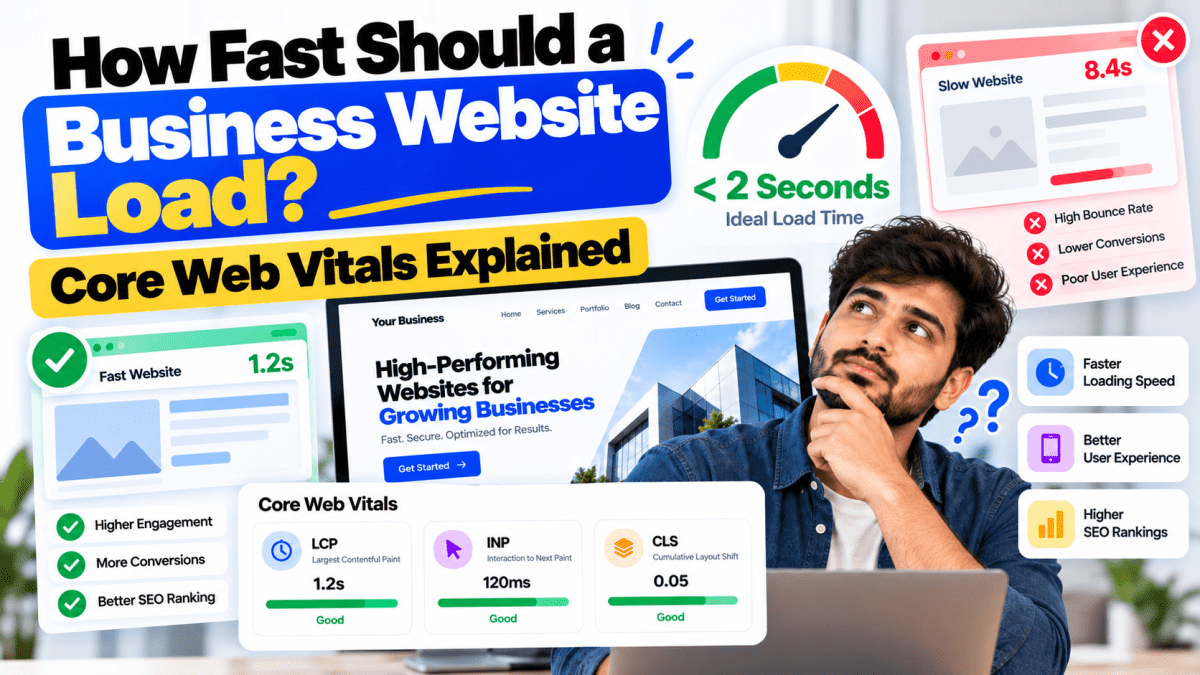
How Fast Should a Business Website Load? Core Web Vitals Explained#
Website speed is no longer just a technical concern.
For a business, website performance can directly influence how customers experience your brand, how easily they can use your website, and whether they complete an important action such as submitting a form, making a purchase, or booking an appointment.
Imagine two websites.
The first loads quickly, displays its main content without jumping around, and responds immediately when a visitor clicks a button.
The second takes several seconds to become usable, shifts elements while loading, and feels unresponsive when the visitor interacts with it.
Even if both websites offer exactly the same product or service, the first website creates a significantly better experience.
This is where Core Web Vitals become important.
Google's Core Web Vitals are a set of user-focused performance metrics designed to measure important aspects of real-world page experience. They currently focus on:
- LCP — Largest Contentful Paint
- INP — Interaction to Next Paint
- CLS — Cumulative Layout Shift
But there is an important point to understand:
There is no single number of seconds that guarantees a website is "fast."
Website performance depends on what users experience, how quickly the main content appears, how responsive the page is, and whether the layout remains stable.
This guide explains how fast a business website should be, what Core Web Vitals mean, what the recommended thresholds are, and how businesses can improve website performance.
What Is Website Speed?#
Website speed is the general term people use to describe how quickly a website loads and responds.
However, a website does not simply have one speed.
There are several stages:
- 1The browser starts loading the page.
- 2The server responds.
- 3HTML is received.
- 4CSS and JavaScript are processed.
- 5Images begin loading.
- 6Main content appears.
- 7The page becomes interactive.
- 8The visitor interacts with buttons and forms.
This means a website can technically begin loading quickly while still feeling slow.
For example, a page might display a logo immediately but take several seconds before the main product image and headline appear.
From the user's perspective, the page is still slow.
That is why modern performance measurement focuses on user experience, not just total page-load time.
How Fast Should a Business Website Be?#
A useful practical target is:
Make the primary content appear quickly, make interactions responsive, and prevent visual movement.
For Core Web Vitals, Google's current "good" thresholds are:
| Metric | Good |
|---|---|
| LCP | ≤ 2.5 seconds |
| INP | ≤ 200 milliseconds |
| CLS | ≤ 0.1 |
These thresholds are measured using real user experience data and are intended to represent a good experience.
However, don't interpret these numbers as:
"If my website loads in 2.4 seconds, everything is perfect."
A website can pass Core Web Vitals and still have serious usability or conversion problems.
Likewise, failing one metric does not automatically mean the website is unusable.
Performance should be evaluated as a complete experience.
What Are Core Web Vitals?#
Core Web Vitals are Google's standardized metrics for measuring important aspects of real-world page experience.
The current three Core Web Vitals measure:
LCP#
How quickly the largest main content element becomes visible.
INP#
How responsive the page is when users interact with it.
CLS#
How stable the page layout is while it loads.
Together, they answer three important questions:
Does the main content appear quickly?
Does the website respond quickly?
Does the page remain visually stable?
1. LCP — Largest Contentful Paint#
LCP stands for Largest Contentful Paint.
It measures how long it takes for the largest visible content element in the viewport to render.
This is often something important such as:
- Large heading
- Hero image
- Product image
- Video poster
- Large text block
For a business website, the LCP element might be the main hero section.
For example:
Build Your Business Website With Stitchbyte
If that headline is the largest visible element, its rendering can influence the LCP measurement.
What Is a Good LCP Score?#
Google's current thresholds are:
Good#
2.5 seconds or less
Needs Improvement#
More than 2.5 seconds and up to 4 seconds
Poor#
More than 4 seconds
The goal should be to keep the main content visible quickly.
Why Does LCP Matter?#
Imagine a visitor clicks your Google result.
The page opens.
But the screen remains mostly blank for several seconds.
The visitor may think:
"Is this website broken?"
They may leave before seeing your offer.
This is particularly damaging for:
- E-commerce
- Paid advertising
- Lead-generation websites
- Service businesses
The visitor should see useful content as quickly as possible.
Common Causes of Poor LCP#
LCP can be affected by:
- Slow server response
- Large hero images
- Unoptimized images
- Render-blocking CSS
- Render-blocking JavaScript
- Slow fonts
- Excessive third-party scripts
- Poor caching
- Inefficient frontend architecture
Improving LCP often requires identifying what is delaying the main content.
How to Improve LCP#
Common strategies include:
Optimize Hero Images#
Compress large images and use appropriate modern formats.
Use Responsive Images#
Don't send a huge desktop image to a small mobile screen.
Improve Server Response Time#
Use efficient hosting, caching, and backend optimization.
Reduce Render-Blocking Resources#
Prioritize the resources needed to display the initial page.
Preload Critical Resources Carefully#
Important assets may need priority, but indiscriminate preloading can make performance worse.
Reduce Unnecessary JavaScript#
Don't load scripts that aren't needed immediately.
2. INP — Interaction to Next Paint#
INP stands for Interaction to Next Paint.
It measures how responsive a page is when users interact with it.
Examples include:
- Clicking a button
- Opening a menu
- Selecting a product option
- Typing into a form
- Opening a modal
- Adding an item to a cart
A website can load quickly but still feel slow if clicks take too long to produce visible feedback.
What Is a Good INP Score?#
Google's current thresholds are:
Good#
200 milliseconds or less
Needs Improvement#
More than 200 ms and up to 500 ms
Poor#
More than 500 ms
The lower the interaction delay, the more responsive the website feels.
Why INP Matters for Businesses#
Consider an e-commerce website.
A customer clicks:
Add to Cart
But nothing appears to happen for half a second or longer.
The customer may click again.
Now you potentially have:
- Duplicate actions
- Confusion
- Frustration
- Poor experience
For interactive websites, responsiveness is particularly important.
Common Causes of Poor INP#
Poor INP is often related to excessive JavaScript work.
Common causes include:
- Large JavaScript bundles
- Long-running tasks
- Heavy event handlers
- Complex UI rendering
- Excessive third-party scripts
- Poorly optimized components
- Blocking the main browser thread
This is especially relevant for modern JavaScript-heavy applications.
How to Improve INP#
Reduce JavaScript#
Only load what the page actually needs.
Break Up Long Tasks#
Avoid forcing the browser to execute huge amounts of work in one task.
Optimize Event Handlers#
Make click and input handlers efficient.
Reduce Unnecessary Rendering#
Avoid repeatedly recalculating or rebuilding large portions of the interface.
Delay Non-Critical Scripts#
Marketing and analytics scripts should not unnecessarily block important interactions.
Use Efficient Frontend Architecture#
Modern frameworks can help, but architecture and implementation quality matter more than simply choosing a popular framework.
3. CLS — Cumulative Layout Shift#
CLS stands for Cumulative Layout Shift.
It measures unexpected movement of visible page elements during loading.
You have probably experienced this.
You try to click:
"Buy Now"
Then an image loads above the button.
The button moves.
You accidentally click something else.
That's a layout shift.
What Is a Good CLS Score?#
Google's current thresholds are:
Good#
0.1 or less
Needs Improvement#
More than 0.1 and up to 0.25
Poor#
More than 0.25
The goal is to keep the page visually stable.
Common Causes of CLS#
Layout shifts often happen because:
- Images don't have dimensions defined
- Ads load dynamically
- Fonts change the layout
- Content is injected above existing content
- Banners appear unexpectedly
- Embedded content changes size
How to Improve CLS#
Set Image Dimensions#
Tell the browser how much space the image needs before it loads.
Reserve Space for Ads#
Don't allow advertising containers to unexpectedly push content downward.
Avoid Injecting Content Above Existing Content#
If content must appear dynamically, consider how much space it will occupy.
Manage Fonts Carefully#
Font loading can cause text to change dimensions.
Reserve Space for Embeds#
Videos, maps, social widgets, and other embedded elements should have predictable dimensions.
Core Web Vitals in Simple Language#
If the technical terms feel confusing, think of Core Web Vitals this way:
LCP#
"Can I see the important content quickly?"
INP#
"Does the website respond quickly when I interact with it?"
CLS#
"Does the page stay where I expect it to stay?"
That's the essence.
Why Website Speed Matters for Business#
Website performance is not just about passing Google's tests.
It affects real users.
A slow website can create:
- Frustration
- Abandonment
- Lower engagement
- Lower conversion opportunities
- Poor perception of the brand
For e-commerce businesses, the stakes can be particularly high because every additional friction point can interfere with the purchase journey.
For lead-generation businesses, slow pages can prevent potential customers from ever reaching the contact form.
Website Speed and SEO#
Website performance is one component of Google's broader page experience considerations.
Google has stated that Core Web Vitals are used by its ranking systems, but also emphasizes that good Core Web Vitals alone do not guarantee strong rankings.
This distinction is important.
Don't believe anyone who says:
"Get a 100/100 PageSpeed score and Google will rank you #1."
That's nonsense.
Search visibility depends on many factors, including:
- Relevance
- Content quality
- Search intent
- Authority
- Technical SEO
- Links
- User experience
- Competition
- Website performance
Speed is important, but it is not the entire SEO strategy.
Core Web Vitals vs PageSpeed Insights#
These terms are often confused.
PageSpeed Insights#
PageSpeed Insights is a Google tool that provides performance information and optimization recommendations.
It can provide:
- Lab data
- Field data
- Performance opportunities
- Diagnostics
Core Web Vitals#
Core Web Vitals are the specific user-experience metrics:
- LCP
- INP
- CLS
Think of PageSpeed Insights as a testing and diagnostic tool.
Core Web Vitals are performance metrics.
Lab Data vs Real User Data#
This is extremely important.
Performance testing can be based on:
Lab Data#
A controlled test environment.
Useful for:
- Development
- Debugging
- Comparing changes
- Identifying problems
Field Data#
Data collected from real users and real devices.
Useful for:
- Understanding actual user experience
- Evaluating Core Web Vitals
- Seeing geographic and device differences
Your own laptop on a fast Wi-Fi connection is not representative of every visitor.
A customer may be using:
- An older Android phone
- Mobile data
- A slower network
- A different browser
Real-world data therefore matters.
What Is a Good PageSpeed Insights Score?#
PageSpeed Insights provides a performance score, but don't treat the score as the entire definition of website quality.
For example:
A website might receive:
95/100
but have poor conversion copy.
Another website might receive:
82/100
but generate significantly more leads.
The second website could be more valuable to the business.
Performance scores are useful diagnostic signals.
They are not business KPIs by themselves.
How to Test Your Website Speed#
You can use several tools to evaluate performance.
Google PageSpeed Insights#
Useful for performance testing and recommendations.
Chrome DevTools#
Useful for developers investigating network requests, rendering, JavaScript, and performance issues.
Lighthouse#
Useful for automated audits covering performance and other areas.
Search Console#
Useful for seeing Core Web Vitals information from Google's search ecosystem when sufficient field data is available.
The important thing is to test repeatedly rather than relying on a single result.
Why Your Speed Score Can Change#
You may run a performance test today and get:
88
Then run it again and get:
94
This can happen because performance is affected by:
- Network conditions
- Server response
- Device conditions
- Third-party services
- Caching
- Test location
- Background activity
Don't panic over every small score change.
Look for consistent problems and real user data.
Website Speed on Mobile vs Desktop#
A website that feels fast on a powerful MacBook may feel slow on an inexpensive smartphone.
Mobile devices have:
- Different processors
- Different memory
- Different network conditions
- Different browsers
This is why mobile performance deserves special attention.
Test your website on actual mobile devices when possible.
Common Reasons Business Websites Are Slow#
1. Huge Images#
High-resolution images can be several megabytes each.
That's unnecessary for most websites.
2. Too Many Plugins#
This is particularly common with WordPress websites.
3. Excessive JavaScript#
Modern websites can become overloaded with scripts.
4. Poor Hosting#
Cheap hosting can become a bottleneck as traffic increases.
5. Third-Party Scripts#
Analytics, chat widgets, advertising tools, social feeds, and other services can add overhead.
6. Unoptimized Fonts#
Multiple font families and weights can increase loading costs.
7. Heavy Video Backgrounds#
Full-screen background video can be expensive.
8. Poor Caching#
Repeatedly generating identical content can waste server resources.
9. Unoptimized Database#
Large or poorly maintained databases can slow dynamic websites.
10. Poorly Structured Frontend#
Complex frontend applications can become expensive for browsers to render.
How to Make a Business Website Faster#
A practical optimization strategy includes:
Step 1 — Measure#
Identify actual bottlenecks.
Step 2 — Optimize Images#
Compress images and use appropriate formats.
Step 3 — Improve Hosting#
Choose infrastructure appropriate for your traffic.
Step 4 — Optimize Server Response#
Use caching and efficient backend logic.
Step 5 — Reduce JavaScript#
Remove unnecessary scripts and dependencies.
Step 6 — Optimize CSS#
Reduce unnecessary styles and prioritize critical rendering.
Step 7 — Optimize Fonts#
Reduce font files and weights.
Step 8 — Optimize Third-Party Services#
Remove services that don't provide meaningful value.
Step 9 — Improve Caching#
Use browser and server-side caching where appropriate.
Step 10 — Test Again#
Measure the impact of each change.
Should You Use a CDN?#
A Content Delivery Network can help deliver static assets from locations closer to users.
A CDN can be useful for:
- Images
- CSS
- JavaScript
- Fonts
- Static files
For businesses serving customers across multiple geographic regions, a CDN can help reduce latency.
However, a CDN is not a magic solution.
If the underlying website is poorly optimized, putting it behind a CDN does not automatically fix everything.
Does Hosting Affect Website Speed?#
Absolutely.
Server response time can affect how quickly the browser receives the initial page.
Hosting quality depends on factors such as:
- CPU
- Memory
- Storage
- Network
- Server location
- Caching
- Configuration
- Traffic
- Application architecture
For a small brochure website, inexpensive hosting may be enough.
For a high-traffic application, you may need more sophisticated infrastructure.
Choose based on requirements.
WordPress Website Speed#
WordPress can be extremely fast when properly configured.
But it can also become slow when overloaded.
Common WordPress performance problems include:
- Too many plugins
- Poorly coded themes
- Huge images
- Excessive database queries
- Poor hosting
- Multiple analytics scripts
- Unnecessary page builders
Performance improvements may include:
- Better hosting
- Caching
- Image optimization
- Plugin cleanup
- CDN
- Database optimization
- Lightweight themes
- Efficient code
Don't blame WordPress automatically.
Implementation quality matters.
Shopify Website Speed#
Shopify handles much of the infrastructure, but store owners can still create performance problems.
Common issues include:
- Too many apps
- Heavy themes
- Large images
- Excessive tracking scripts
- Unnecessary animations
- Third-party widgets
A Shopify store should be reviewed periodically to identify unnecessary code and apps.
React and Next.js Website Performance#
Modern frameworks such as React and Next.js can provide excellent performance when implemented correctly.
But using a modern framework does not automatically make a website fast.
Poor performance can still come from:
- Large JavaScript bundles
- Excessive client-side rendering
- Unoptimized images
- Too many dependencies
- Heavy components
- Unnecessary API calls
Framework choice matters.
Architecture matters more.
Don't Optimize Only for a Perfect Score#
This is one of the biggest mistakes developers make.
You can spend days chasing:
98 → 99 → 100
while ignoring the actual business problem.
Suppose:
- PageSpeed: 100
- Conversion rate: 0.5%
versus:
- PageSpeed: 92
- Conversion rate: 4%
The second website is likely generating far more business.
Performance matters.
But performance exists to serve the user and business objective.
Speed and Conversion Optimization Should Work Together#
Consider an e-commerce product page.
You need:
- Fast product images
- Clear product information
- Reviews
- Price
- Shipping information
- CTA
- Payment options
Removing all images to make the page faster isn't necessarily a smart strategy.
The objective is to make the right content fast, not to remove valuable content simply to improve a score.
How Fast Should Your Homepage Be?#
There isn't one universal number.
Instead, aim for:
- Fast server response
- Main content appearing quickly
- Responsive interactions
- Stable layout
- Minimal unnecessary waiting
For Core Web Vitals, aim for:
LCP ≤ 2.5 seconds
INP ≤ 200 ms
CLS ≤ 0.1
These are Google's current "good" thresholds.
But always evaluate the complete user experience.
How Fast Should an E-commerce Website Be?#
E-commerce sites should be particularly careful with performance because users need to:
- Browse products
- Filter products
- Open images
- Change variants
- Add to cart
- Checkout
- Enter payment information
Performance problems anywhere in this process can create friction.
Focus especially on:
- Product listing pages
- Product pages
- Cart
- Checkout
- Mobile experience
How Fast Should a Lead Generation Website Be?#
For a lead-generation website, prioritize the pages receiving paid and organic traffic.
For example:
Google Ad → Landing Page
That landing page should quickly display:
- Offer
- Headline
- Benefits
- CTA
Don't make a potential customer wait through a massive animation before they can even understand the offer.
Website Speed Checklist#
Use this checklist when reviewing your website.
Technical#
- [ ] Fast server response
- [ ] HTTPS
- [ ] Efficient hosting
- [ ] Caching
- [ ] CDN where appropriate
- [ ] Optimized database
Images#
- [ ] Compressed images
- [ ] Appropriate dimensions
- [ ] Modern formats where appropriate
- [ ] Lazy loading for non-critical images
JavaScript#
- [ ] Remove unnecessary scripts
- [ ] Minimize long tasks
- [ ] Reduce third-party scripts
- [ ] Load non-critical scripts appropriately
CSS#
- [ ] Reduce unnecessary CSS
- [ ] Avoid excessive render-blocking resources
- [ ] Optimize critical styles
Fonts#
- [ ] Limit font families
- [ ] Limit font weights
- [ ] Optimize font loading
Layout#
- [ ] Image dimensions defined
- [ ] Reserved space for dynamic content
- [ ] Stable page structure
Mobile#
- [ ] Test real devices
- [ ] Test mobile networks
- [ ] Check forms
- [ ] Check menus
- [ ] Check checkout
When Should You Invest in Website Performance Optimization?#
Consider a performance audit if:
- Your website feels slow
- PageSpeed reports major problems
- Core Web Vitals are poor
- Mobile users complain
- Conversion rates are declining
- Bounce rates are high
- Paid traffic is expensive
- Your e-commerce checkout feels slow
- Your website uses excessive plugins
- Your technology is outdated
Performance optimization can sometimes produce significant improvements without rebuilding the entire website.
When Is a Website Rebuild Necessary?#
Optimization is not always enough.
A rebuild may make sense when:
- The technology is obsolete
- The codebase is difficult to maintain
- The architecture creates performance limitations
- Security vulnerabilities cannot be reasonably addressed
- The website has become too complex
- The CMS is no longer suitable
- Business requirements have changed significantly
Don't rebuild simply because the PageSpeed score is poor.
First identify the root cause.
Core Web Vitals and Business ROI#
Ultimately, the question isn't:
"Did we improve LCP by 300 milliseconds?"
The better question is:
"Did the improvement create a better customer experience or improve business performance?"
Track:
- Conversion rate
- Leads
- Sales
- Revenue
- Bounce/engagement signals
- Checkout completion
- Form completion
- Organic traffic
Performance optimization should support measurable outcomes.
How Stitchbyte Approaches Website Performance#
At Stitchbyte, website performance is treated as part of the development process rather than something to consider only after launch.
Depending on the project, performance work can include:
- Image optimization
- Responsive images
- Code optimization
- JavaScript optimization
- CSS optimization
- Caching
- CDN configuration
- Hosting optimization
- Database optimization
- Third-party script review
- Mobile optimization
- Core Web Vitals monitoring
We work with technologies and platforms including:
- WordPress
- Shopify
- React
- Next.js
- Node.js
- Custom web applications
The correct optimization strategy depends on the technology and the actual bottleneck.
A WordPress website with 40 unnecessary plugins needs a different solution from a Next.js application with an oversized JavaScript bundle.
The objective is not simply to chase a score.
The objective is to make the website fast, responsive, stable, and useful for real customers.
Final Verdict#
So, how fast should a business website load?
The practical answer is:
As fast as possible without sacrificing functionality, content, usability, or business objectives.
For Google's current Core Web Vitals "good" thresholds, aim for:
LCP#
2.5 seconds or less
INP#
200 milliseconds or less
CLS#
0.1 or less
But don't make the mistake of treating these three numbers as the entire definition of website performance.
A truly high-quality website should:
- Show important content quickly
- Respond to interactions quickly
- Remain visually stable
- Work well on mobile
- Provide useful content
- Be easy to navigate
- Support conversions
- Be technically reliable
And most importantly:
It should help the business make money.
A website that scores perfectly but doesn't generate customers is not a successful website.
A website that provides an excellent user experience, supports SEO, loads efficiently, and helps visitors become customers is far more valuable.
Frequently Asked Questions#
What are Core Web Vitals?#
Core Web Vitals are Google's user-focused performance metrics covering loading performance, interaction responsiveness, and visual stability. The current metrics are LCP, INP, and CLS.
What is a good LCP score?#
A good LCP is 2.5 seconds or less.
What is a good INP score?#
A good INP is 200 milliseconds or less.
What is a good CLS score?#
A good CLS is 0.1 or less.
Does website speed affect SEO?#
Website performance and page experience are considered by Google's systems, but speed alone does not determine rankings. Relevance, content quality, authority, search intent, and many other factors also matter.
Does a 100 PageSpeed score guarantee good SEO?#
No. A perfect PageSpeed score does not guarantee high search rankings or high conversions.
Why is my website slow even though I have good hosting?#
The problem may be caused by images, JavaScript, third-party scripts, database queries, frontend architecture, plugins, fonts, or other components.
Is WordPress slow?#
Not inherently. A properly built and optimized WordPress website can perform very well. Poor plugins, themes, hosting, and implementation can create performance problems.
Is Shopify fast?#
Shopify provides managed infrastructure, but individual stores can still become slow because of heavy themes, apps, images, scripts, and customizations.
Does a CDN make a website faster?#
A CDN can reduce delivery latency for static resources, particularly for geographically distributed audiences. However, it does not automatically fix inefficient code or a poorly optimized website.
Should I optimize my website for mobile first?#
Yes. Mobile users should be treated as a first-class audience. Test performance and usability on real mobile devices and networks.
Should I rebuild my website if Core Web Vitals are poor?#
Not necessarily. Many performance issues can be fixed through optimization. A rebuild is more appropriate when the underlying technology or architecture is fundamentally limiting performance.
How often should I check website performance?#
Check performance regularly, particularly after major design changes, plugin installations, feature releases, advertising campaigns, or infrastructure changes.
Is Your Business Website Fast Enough?#
Don't guess.
Test it.
Measure real performance.
Identify the bottlenecks.
Then fix the problems that matter most.
If your website is slow, unstable, difficult to use on mobile, or struggling with Core Web Vitals, Stitchbyte can help audit and optimize the website across design, development, infrastructure, and performance.
The goal isn't to make your website win a speed test.
The goal is to make your customers experience your business faster.
Planning a Custom Website or Web App in 2026?
Avoid agency markups and hidden renewal fees. Speak with our lead architects for a transparent, itemized scope and architectural proposal tailored to your business goals.
Related Topics & Tags
Enjoyed this article?
Share it with your teammates or network.
StitchByte Team
AuthorPublished by the StitchByte engineering & design team. We build high-performance web applications, AI automation agents, and modern digital platforms for scaling businesses across India and globally.