Custom Website vs WordPress: Which Is Better for Your Business?#
Choosing the right technology for your business website can be surprisingly difficult.
You may hear one developer say:
“You should build everything from scratch.”
Another might say:
“Just use WordPress. It’s cheaper and faster.”
Then you start comparing technologies, pricing, features, hosting, SEO, security, scalability, maintenance, and performance—and suddenly a simple website project feels like a technology decision worth a small board meeting.
The truth is that there is no universal winner between a custom website and WordPress.
Both can be excellent choices.
The right option depends on what your business actually needs.
A local service business with ten pages doesn't necessarily need a fully custom web application. On the other hand, a company requiring complex workflows, custom dashboards, advanced integrations, or highly specialized functionality may quickly outgrow a standard WordPress setup.
In this guide, we'll compare custom websites vs WordPress websites across cost, performance, SEO, security, scalability, customization, maintenance, speed, e-commerce, and long-term business value.
By the end, you'll have a much clearer idea of which approach makes sense for your business.
What Is a Custom Website?#
A custom website is a website designed and developed specifically for a business rather than being built primarily around a pre-existing WordPress theme.
The technology can vary.
A custom website might use technologies such as:
- HTML
- CSS
- JavaScript
- React
- Next.js
- Node.js
- PHP
- Laravel
- Python
- Django
- Java
- Spring Boot
- MongoDB
- PostgreSQL
- MySQL
The technology should be selected based on the project's requirements.
A custom website gives developers greater control over:
- Architecture
- UI/UX
- Functionality
- Database structure
- APIs
- Integrations
- Authentication
- Performance
- Business logic
- Scalability
For simple websites, this level of customization may be unnecessary.
For complex businesses, it can be extremely valuable.
What Is a WordPress Website?#
WordPress is a content management system that allows businesses to create and manage websites using an established platform.
Instead of developing every component from scratch, businesses can use:
- Themes
- Plugins
- WordPress blocks
- Page builders
- Custom themes
- Custom plugins
- Third-party integrations
WordPress is particularly popular for:
- Business websites
- Blogs
- News websites
- Portfolio websites
- Service businesses
- Content-heavy websites
- Membership websites
- Some e-commerce stores
One of its biggest advantages is that non-technical users can manage website content without needing to modify the underlying code.
Custom Website vs WordPress: Quick Comparison#
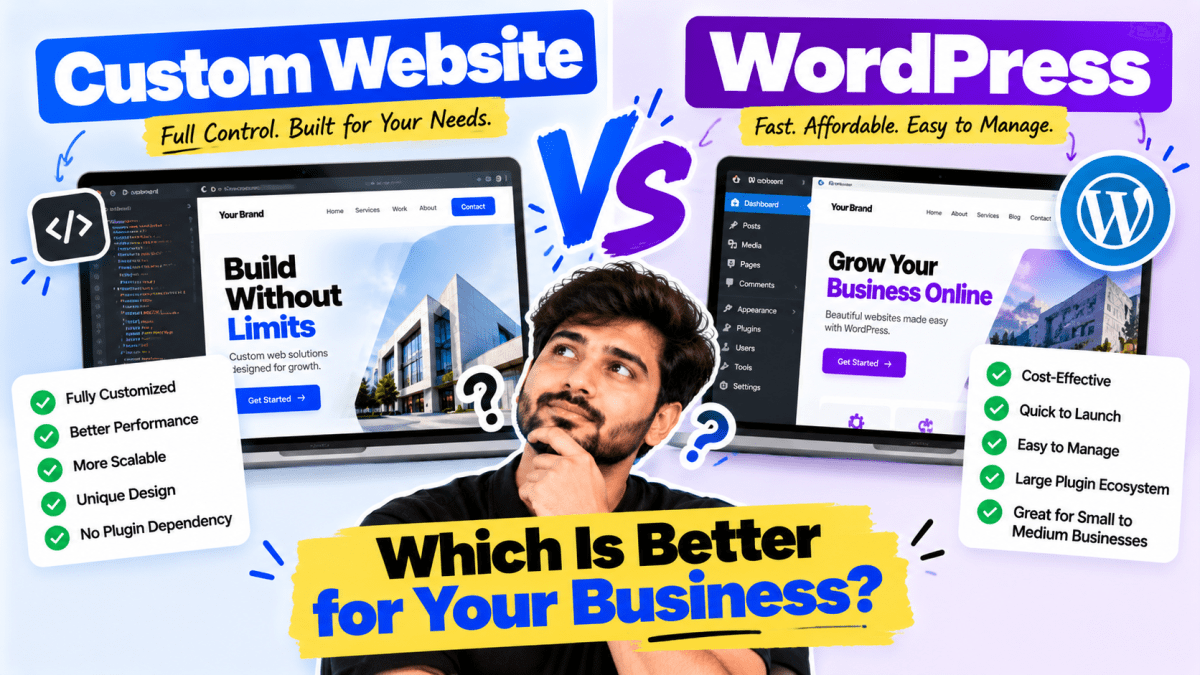
| Factor | Custom Website | WordPress |
|---|---|---|
| Initial cost | Usually higher | Usually lower |
| Development time | Usually longer | Usually faster |
| Customization | Very high | High |
| Content management | Depends on implementation | Excellent |
| Performance potential | Very high | High with optimization |
| Scalability | Excellent | Good to excellent depending on architecture |
| Plugin dependency | Usually low | Can be high |
| Maintenance | Developer-dependent | Requires updates and maintenance |
| Security | Depends on development | Requires active maintenance |
| SEO | Can be excellent | Can be excellent |
| Ease of editing | Depends on CMS | Excellent |
| Complex functionality | Excellent | Possible, but may require custom development |
| Best for | Complex/custom requirements | Most standard business websites |
| Long-term cost | Varies | Varies |
The important point is this:
WordPress isn't automatically inferior, and custom development isn't automatically superior.
The requirements determine the right choice.
Custom Website vs WordPress: Which One Should You Choose?#
For most businesses, the decision can be simplified into one question:
Do you need functionality that requires custom development, or do you primarily need a professional website that is easy to manage?
If you need:
- Complex business logic
- Custom dashboards
- Advanced integrations
- Unique workflows
- Specialized applications
- Custom user roles
- Complex databases
- High levels of automation
then custom development may make more sense.
If you need:
- Company information
- Services
- About page
- Portfolio
- Blog
- Contact forms
- Basic lead generation
- Easy content editing
WordPress may be the more practical option.
1. Cost: WordPress Usually Has a Lower Starting Cost#
One of WordPress's biggest advantages is cost efficiency.
A business can start with:
- WordPress
- Hosting
- A theme
- Necessary plugins
- Professional customization
This can be significantly cheaper than building a complete custom CMS and frontend/backend architecture from scratch.
However, there is an important catch.
Cheap WordPress does not automatically mean cheap long-term.
Costs can accumulate through:
- Premium plugins
- Premium themes
- Developer maintenance
- Security services
- Hosting upgrades
- Plugin conflicts
- Custom development
- Performance optimization
Similarly, custom development can have higher initial costs but may provide better value when the business requires specialized functionality.
The correct comparison is therefore:
Total cost of ownership—not simply development price.
2. Custom Websites Offer Greater Control#
With a custom website, developers can control the architecture from the ground up.
For example, if a company needs:
- Custom customer portals
- Complex booking systems
- Real-time dashboards
- Subscription systems
- Multi-vendor functionality
- Advanced APIs
- Internal business workflows
developers don't have to force those requirements into the structure of an existing CMS.
They can build the system around the business.
This can produce a cleaner architecture for highly specialized projects.
3. WordPress Is Easier for Content Management#
This is where WordPress is extremely strong.
Suppose your marketing team wants to publish a new blog post.
With WordPress, they can usually:
- 1Log in
- 2Create a post
- 3Add content
- 4Upload images
- 5Optimize metadata
- 6Publish
No developer needs to manually deploy a new page.
For businesses that publish content frequently, this can be a major advantage.
4. Custom Websites Can Also Have Powerful CMS Systems#
Choosing custom development doesn't mean you have to sacrifice content management.
A custom website can be connected to:
- A headless CMS
- A custom admin panel
- Sanity
- Strapi
- Contentful
- Directus
- A custom-built CMS
- Other content platforms
This allows businesses to have custom functionality while still allowing non-technical employees to manage content.
So the real comparison isn't:
Custom = no CMS
and
WordPress = CMS
That's outdated thinking.
The real question is:
Which content management architecture best fits the business?
5. Performance: Custom Can Have an Advantage#
A custom website can be built specifically around performance.
Developers can avoid unnecessary:
- Plugins
- JavaScript
- CSS
- Theme functionality
- Third-party scripts
- Database queries
This can result in a lightweight website.
For example, a custom site using a modern framework and optimized architecture can be designed to load only the resources required by each page.
However, don't assume every custom website is fast.
Bad custom code can be slower than a well-optimized WordPress website.
Performance depends on:
- Architecture
- Hosting
- Code quality
- Image optimization
- Caching
- Database queries
- JavaScript
- Third-party scripts
- CDN configuration
A well-built WordPress website can be extremely fast.
6. WordPress Performance Depends Heavily on Implementation#
WordPress itself isn't necessarily the reason a website is slow.
Poor implementation often is.
For example, a website might have:
- 50 plugins
- Huge images
- Multiple page builders
- Unoptimized scripts
- Poor hosting
- Excessive tracking tools
- Heavy animations
- Poorly coded themes
The result can be a slow website.
A professionally optimized WordPress site can use:
- Lightweight themes
- Proper caching
- CDN
- Optimized images
- Minimal plugins
- Efficient database configuration
- Good hosting
- Optimized code
The goal should always be performance—not simply choosing a technology because someone claims it is "faster."
7. SEO: Both Can Rank on Google#
This is one of the biggest misconceptions in website development.
Some businesses believe:
“Custom websites rank better than WordPress.”
That's not a reliable rule.
WordPress websites can rank extremely well.
Custom websites can rank extremely well.
Search performance depends on many factors, including:
- Content quality
- Search intent
- Technical SEO
- Website structure
- Internal linking
- Page experience
- Backlinks
- Relevance
- Authority
- Crawlability
- Mobile usability
A badly optimized custom website won't automatically outrank a well-optimized WordPress website.
Likewise, installing an SEO plugin doesn't automatically make a WordPress website rank.
SEO is a strategy, not a platform feature.
8. WordPress Is Excellent for Content Marketing#
If your business plans to publish:
- Blogs
- Guides
- Case studies
- News
- Industry insights
- Resources
WordPress can be particularly convenient.
Content teams can create and update pages without depending heavily on developers.
For businesses pursuing long-term SEO, that flexibility can be valuable.
9. Custom Websites Are Better for Unique Business Logic#
Imagine a business that needs a system where:
- Customers create accounts
- Customers upload documents
- Staff review applications
- Different employees have different permissions
- Customers receive status updates
- Payments are processed
- External APIs are connected
- Internal dashboards display live data
You could potentially build parts of this around WordPress.
But eventually, the question becomes:
Why are we forcing an application into a content-management system?
A custom application architecture may make more sense.
10. Security: Neither Option Is Automatically Secure#
Security is often oversimplified.
People say:
"Custom websites are secure."
or:
"WordPress is insecure."
Neither statement is universally true.
Security depends on implementation and maintenance.
WordPress security requires:#
- Core updates
- Plugin updates
- Theme updates
- Strong authentication
- Secure hosting
- Backups
- Malware monitoring
- Proper permissions
- Security configuration
Custom website security requires:#
- Secure coding
- Authentication controls
- Authorization
- Input validation
- API security
- Dependency updates
- Database security
- Server configuration
- Logging
- Monitoring
- Regular patching
A badly developed custom website can have serious vulnerabilities.
A well-maintained WordPress website can be secure.
11. WordPress Plugin Dependency Can Become a Problem#
Plugins are one of WordPress's greatest strengths.
They are also one of its biggest potential weaknesses.
A plugin can add functionality quickly.
For example:
- Contact forms
- SEO
- Caching
- Analytics
- E-commerce
- Memberships
- Booking
- Security
- Backups
But every additional plugin can introduce:
- Maintenance requirements
- Compatibility risks
- Performance overhead
- Security considerations
That's why professional WordPress development should avoid installing plugins simply because they exist.
Use only what the business actually needs.
12. Custom Development Reduces Dependency on Third-Party Plugins#
With custom development, functionality can be built directly into the application.
Instead of installing five plugins for:
- Authentication
- User management
- Dashboard
- Payments
- Notifications
- API integrations
a custom system can be designed around those requirements.
This can provide more control.
But it also means the business becomes more dependent on its development team.
That's an important trade-off.
13. Scalability: Custom Usually Wins for Complex Systems#
If you're building a small company website, scalability may not be a major concern.
If you're building a large platform with:
- Millions of users
- Complex workflows
- Large databases
- Real-time features
- Multiple integrations
- Advanced permissions
- High traffic
architecture becomes much more important.
Custom development allows engineers to design infrastructure specifically around expected workloads.
This can make it easier to optimize the system as requirements evolve.
But WordPress can also scale surprisingly well when properly engineered.
Large WordPress installations can use:
- Caching
- CDNs
- Database optimization
- Object caching
- Load balancing
- Specialized hosting
- Headless architecture
Again, architecture matters more than labels.
14. Custom Websites Provide Better Design Freedom#
A custom website allows designers to create interfaces without being constrained by a theme.
You can create:
- Unique layouts
- Custom animations
- Interactive sections
- Custom dashboards
- Unique navigation
- Advanced visual effects
- Specialized user experiences
This is particularly valuable for brands that want strong differentiation.
However, customization should have a purpose.
A website doesn't become better simply because it has more animations.
15. WordPress Can Also Be Highly Customized#
Another common misconception is:
"WordPress means using a template."
Not necessarily.
Developers can create:
- Custom WordPress themes
- Custom blocks
- Custom plugins
- Custom post types
- Custom APIs
- Custom admin functionality
This can provide a middle ground.
You can get the flexibility of custom development while retaining WordPress's content-management capabilities.
For many businesses, this is an excellent solution.
16. Maintenance: WordPress Requires Ongoing Attention#
WordPress websites aren't "build once and forget forever."
They require maintenance.
This can include:
- WordPress updates
- Plugin updates
- Theme updates
- Security checks
- Backups
- Performance monitoring
- Compatibility testing
Skipping maintenance can create problems later.
A professional WordPress maintenance plan should therefore be part of the website strategy.
17. Custom Websites Also Need Maintenance#
Custom websites aren't maintenance-free either.
Developers may need to update:
- Frameworks
- Libraries
- Dependencies
- APIs
- Server software
- Security configurations
- Databases
As browsers, operating systems, APIs, and security standards change, websites need maintenance.
So the assumption:
"Custom website = no maintenance"
is incorrect.
Every serious website is a software product.
Software requires maintenance.
18. Development Speed: WordPress Usually Wins#
If you need a standard business website quickly, WordPress can be significantly faster to launch.
A typical project might involve:
- Theme setup
- Brand customization
- Page creation
- Plugin configuration
- Content
- SEO
- Testing
- Launch
A custom website often requires more development work.
You may need to build:
- Components
- Backend
- Database
- Admin system
- Authentication
- APIs
- Forms
- CMS
- Deployment infrastructure
For a simple website, that additional work may not create enough business value to justify the cost.
19. Custom Development Makes More Sense When Requirements Are Unique#
Consider these examples.
Business A#
A local salon needs:
- 7-page website
- Services
- Gallery
- Reviews
- Contact
- Appointment enquiry
WordPress is probably enough.
Business B#
A startup wants:
- Customer accounts
- Subscription plans
- Automated workflows
- Custom dashboards
- Third-party integrations
- AI features
- Real-time data
Custom development is likely more appropriate.
Business C#
A company needs:
- Marketing website
- Blog
- Case studies
- Lead generation
- SEO
WordPress is a strong candidate.
Business D#
A company wants:
- Marketplace
- Multiple vendors
- Commission calculations
- Vendor dashboards
- Customer wallets
- Advanced order workflows
Custom development may be the better long-term architecture.
20. When Should You Choose WordPress?#
WordPress is often a strong choice if you need:
- Business website
- Corporate website
- Service website
- Portfolio
- Blog
- News website
- Content-heavy website
- Basic lead-generation website
- Small business website
- Marketing website
It is particularly useful when:
Content needs to be updated frequently by non-developers.
21. When Should You Choose a Custom Website?#
Custom development becomes more attractive when you need:
- Complex functionality
- Custom business logic
- Advanced integrations
- Custom dashboards
- Unique workflows
- Large-scale applications
- Complex user roles
- Specialized databases
- Real-time functionality
- Custom automation
- SaaS platforms
- Marketplace systems
- Internal business software
The more unique the requirements, the stronger the case for custom development.
22. What About E-commerce?#
This depends on the type of e-commerce business.
For many businesses, platforms such as Shopify or WooCommerce can provide everything they need.
WordPress + WooCommerce may work well for:#
- Small to medium stores
- Content-heavy stores
- Businesses already using WordPress
- Highly customizable product catalogs
Shopify may be better for businesses wanting:#
- Faster setup
- Managed infrastructure
- Simplified operations
- Strong e-commerce tooling
Custom e-commerce may make sense when:#
- Product logic is highly unusual
- Pricing is complex
- Customer workflows are unique
- Multiple systems need deep integration
- Business processes don't fit standard platforms
- Custom marketplace functionality is required
Don't build a custom e-commerce platform just because you can.
Build custom when the business actually needs it.
23. The Hybrid Approach Can Be the Best Option#
There is another approach businesses often overlook.
You don't necessarily have to choose between:
100% WordPress
and
100% custom
You can combine technologies.
For example:
Marketing website#
WordPress
Custom customer dashboard#
React/Next.js
Backend#
Node.js
Database#
PostgreSQL or MongoDB
Payments#
Payment gateway API
CRM#
External CRM
This architecture can allow different systems to do what they're best at.
However, hybrid architectures introduce additional complexity.
They should be used when the benefits justify that complexity.
24. Don't Choose Technology Before Defining Requirements#
This is one of the biggest mistakes businesses make.
They start with:
"Should we use WordPress or React?"
That's the wrong starting point.
Start with:
Business objective#
What should the website accomplish?
Audience#
Who will use it?
Functionality#
What does the user need to do?
Content#
Who will manage it?
Integrations#
What external systems need to connect?
Scale#
How much traffic and data are expected?
Budget#
What investment makes sense?
Timeline#
When does the business need to launch?
Then choose the technology.
25. A Simple Decision Framework#
Use this framework.
Choose WordPress if:#
You need a professional website quickly + easy content management + standard functionality.
Choose custom development if:#
You need unique functionality + complex workflows + deep integrations + application-level capabilities.
Choose a hybrid architecture if:#
You need a content-focused website plus sophisticated custom functionality.
This framework will solve the decision for most businesses.
Custom Website vs WordPress: Cost Considerations#
The price of a website depends on much more than the platform.
WordPress costs can include:#
- Domain
- Hosting
- Theme
- Plugins
- Design
- Development
- Content
- SEO
- Security
- Maintenance
Custom website costs can include:#
- UI/UX
- Frontend development
- Backend development
- Database
- APIs
- Authentication
- Hosting
- DevOps
- Testing
- Security
- Maintenance
Therefore, instead of asking:
"Which is cheaper?"
ask:
"Which solution gives my business the right capabilities at an acceptable total cost?"
Why the Cheapest Website Isn't Always the Best Website#
A business website is an investment.
Saving ₹10,000 during development isn't useful if the website:
- Generates fewer leads
- Looks unprofessional
- Loads slowly
- Requires constant repairs
- Can't support future requirements
- Has poor SEO
- Creates a bad customer experience
At the same time, spending ₹5 lakh on a custom website doesn't make sense if a well-built WordPress website for ₹30,000–₹80,000 can accomplish the same business goals.
The objective is not:
Maximum technology.
The objective is:
Maximum business value.
Questions to Ask Your Web Development Company#
Before hiring a developer or agency, ask:
1. Why are you recommending this technology?#
You should get a business-focused explanation.
2. What happens if I need new features later?#
Understand scalability.
3. Who will maintain the website?#
Clarify responsibilities.
4. Who owns the code and website?#
Make ownership explicit.
5. Can I edit the content myself?#
Especially important for WordPress and CMS-based websites.
6. How will you handle security?#
Ask about updates, backups, authentication, and monitoring.
7. How will you optimize performance?#
Ask for a concrete plan.
8. Is SEO included?#
Understand exactly what "SEO included" means.
9. What happens after launch?#
Clarify support and maintenance.
10. What happens if I leave the agency?#
Your business shouldn't be trapped by unclear ownership or access.
Custom Website vs WordPress: Our Recommendation#
Here's the blunt answer.
For most small and medium businesses:#
WordPress is often enough.
If you're building a:
- Company website
- Service website
- Portfolio
- Blog
- Local business website
- Professional services website
there is often no reason to spend heavily on custom architecture.
A professionally designed and optimized WordPress website can deliver excellent results.
For businesses building software:#
Custom development is often better.
If you're building:
- SaaS
- Marketplace
- CRM
- Customer portal
- Booking platform
- Automation system
- Complex e-commerce platform
- Internal business software
custom development may provide a much stronger foundation.
For businesses somewhere in the middle:#
Consider a hybrid approach.
How Stitchbyte Approaches This Decision#
At Stitchbyte, we don't believe every client should be pushed toward the same technology.
A business doesn't need a custom React/Node.js application just because it's technically impressive.
And it shouldn't be forced into WordPress if its requirements clearly demand a custom application.
We evaluate:
- Business goals
- Customer journey
- Required functionality
- Content management
- Budget
- Timeline
- SEO requirements
- Performance
- Scalability
- Future expansion
Then we recommend the architecture that makes the most business sense.
For a standard business website, that may be WordPress.
For an e-commerce business, it may be Shopify or WooCommerce.
For a complex platform, it may be a custom stack using technologies such as Next.js, React, Node.js, or another appropriate architecture.
The technology should serve the business.
The business should never be forced to serve the technology.
Final Verdict: Custom Website or WordPress?#
There is no universal winner.
The better option depends on your requirements.
Choose WordPress when you want:#
- Lower initial development complexity
- Faster launch
- Easy content management
- Strong blogging capabilities
- Standard business functionality
- Cost-effective development
Choose custom development when you need:#
- Maximum flexibility
- Unique business logic
- Complex workflows
- Advanced integrations
- Custom applications
- Sophisticated dashboards
- Greater architectural control
Choose a hybrid solution when:#
- You need WordPress-style content management
- But also require complex custom functionality
The most important thing is to avoid choosing technology based purely on hype.
Your website should solve a business problem.
If WordPress can solve it effectively, use WordPress.
If custom development is genuinely necessary, build custom.
Good technology isn't the technology with the most features.
Good technology is the technology that solves the right problem at the right cost.
Frequently Asked Questions#
Is WordPress better than a custom website?#
Not universally. WordPress is often better for businesses that need a professional, content-managed website with standard functionality. Custom development is usually more appropriate when the business requires unique functionality or complex application logic.
Is a custom website faster than WordPress?#
It can be, because developers have greater control over the architecture and can avoid unnecessary functionality. However, a well-optimized WordPress website can also be very fast. Performance depends heavily on implementation.
Is WordPress good for business websites?#
Yes. WordPress can be an excellent choice for business websites, especially when the company needs easy content management, blogging, SEO capabilities, and standard website functionality.
Is a custom website better for SEO?#
Not automatically. Both custom websites and WordPress websites can perform well in search engines. SEO depends on content, technical implementation, website structure, performance, relevance, authority, and many other factors.
Is WordPress cheaper than custom development?#
WordPress usually has a lower starting development cost because many components already exist. However, the total cost depends on design, customization, plugins, hosting, maintenance, and future development requirements.
Can WordPress handle large websites?#
Yes. WordPress can support large and high-traffic websites when properly engineered and hosted. Complex requirements may eventually make a custom or hybrid architecture more appropriate.
Is a custom website harder to maintain?#
It can be, depending on the technology and development team. Custom websites may require developers for updates and new features, while WordPress allows many content and administrative tasks to be performed through its interface.
Can I migrate from WordPress to a custom website later?#
Yes. Businesses can migrate content and functionality from WordPress to another architecture. However, migrations require careful planning to preserve URLs, SEO, content, redirects, metadata, and functionality.
Should a small business use WordPress or custom development?#
For most small businesses requiring a standard company website, WordPress is often the more practical choice. Custom development makes more sense when the business requires functionality that standard CMS solutions cannot efficiently provide.
Should I use WordPress for an e-commerce website?#
WordPress with WooCommerce can be suitable for many e-commerce businesses. However, Shopify or custom development may be better depending on your requirements, operations, integrations, and long-term growth plans.
How much does a WordPress website cost in India?#
There is no single fixed price. Cost depends on the number of pages, design quality, customization, functionality, content, SEO, integrations, hosting, and maintenance requirements.
How much does a custom website cost in India?#
Custom websites can range from relatively simple custom builds to sophisticated applications costing significantly more. The biggest factors are functionality, architecture, integrations, UI/UX, backend requirements, database complexity, and development time.
Need Help Choosing the Right Website Technology?#
Don't choose WordPress or custom development simply because a developer told you it's "better."
Choose based on what your business actually needs.
Stitchbyte helps businesses plan, design, and develop websites based on business objectives—not technology hype.
Whether you need a professional WordPress website, Shopify store, custom web application, landing page, or complete digital platform, we can help you choose the right architecture and build it for growth.
Stitchbyte — Let's Build Something Extraordinary.
Planning a Custom Website or Web App in 2026?
Avoid agency markups and hidden renewal fees. Speak with our lead architects for a transparent, itemized scope and architectural proposal tailored to your business goals.
Related Topics & Tags
Enjoyed this article?
Share it with your teammates or network.
StitchByte Team
AuthorPublished by the StitchByte engineering & design team. We build high-performance web applications, AI automation agents, and modern digital platforms for scaling businesses across India and globally.